Showing posts with label nhibernate. Show all posts

May 30, 2013

Migrating from Castle ActiveRecord

Unfortunately Castle ActiveRecord project is abandoned and not developed anymore. Latest release uses NHibernate 3.0 and is not compatible with last NHibernate due  to the changes in API of dynamic proxy.

So we have decided to remove dead assembly and move on. In order to do that there some major steps that needed to be done:

  1. Rewrite all dependent code that used ActiveRecordMediator class
  2. Implement ISession, ISessionFactory lifetime management
  3. Reconfigure NHibernate without using AR wrappers over configuration
  4. Export existing AR mappings based on attributes to XML
  5. Migrate XML mappings to mapping by code

First two steps are tightly related. Methods in ActiveRecordMediator class are easily translated into appropriate analogs in ISession object. We already had a Repositories layer that was used to encapsulate all NHibernate related code, so it was not a really big problem to inject session to them.

For lifetime management we implemented same solution that was described in my blog earlier – let the IoC container resolve it.

Now about third step. NHibernate has not a lot of configuration in fact. All the new API descriptions can be found here. AR doesn’t add a lot, so nothing fancy here.

Export ActiveRecord mappings to XML

With exporting mappings things are starting to get interesting. I couldn’t find an out of the box way in AR to do that. So in fact I had to copy paste methods and to make something from AR public to support this. So here is a mapper class that allows exporting (btw AR sources that we have used before removing it). Line 21 is a place where you have map as a string and do anything you want with it.

Migration from hbm.xml to code

Sure you can stop migration here and just keep XML mappings. But that is just not good enough. Now there is a task of converting XML mappings to code. What is the best tool to covert XML to anything else?.. Well its XSLT. Sorry for that, but it is as it is. So I’ve created a transformation that is capable to do what is needed. Source is too long to put here, so I’m putting a link to appropriate gist. There are some preparations need for mappings – remove all nhibernate namespaces and wrappers like

<hibernate-mapping  auto-import="true" default-lazy="false" xmlns:xsd="http://www.w3.org/2001/XMLSchema" xmlns:xsi="http://www.w3.org/2001/XMLSchema-instance" xmlns="urn:nhibernate-mapping-2.2">
    <!-- mapping here should be kept --> 
</hibernate-mapping>

It uses XSLT 2.0 that is not supported by default .net tools. To run it you can use saxonica tool. In order to run it you can use following command line:

c:\Program Files\Saxonica\SaxonPE9.4N\bin\Transform.exe -s:mappings.xml -xsl:nbmToCs.xslt -o:mappings.cs

So after doing that you will have new nice mappings. Not everything that is supported by NHibernate is supported by XSLT, I’ve added only things that we needed. If you need to add something, feel free to contact me.

Mar 28, 2012

ASP.NET MVC extension points in action

Recently I made a tech talk about my alt.net web stack of love. It has lots of things there. Validation, NHibernate, Routing etc. So here are slides:

Source code for it is on bitbucket. Its purpose is just see it all in action. If you want, you should move code your new/old projects. Don’t try to make some type of project template out of it.

To try things out

Once again link to sources.

I was asked to give some kind of practice task to try all stack together. So here it is:

Implement blog details page to show posts inside it. So when I open localhost/blogs/3 I should see something like:

untitled_page

When I navigate to post details page I should be able to see post content and leave comments. Just like on this blog Smile.

Mar 5, 2012

Using ASP.NET MVC 4 WebAPI with NHibernate and Autofac

Wanted to try how they play together. So it will yet another tutorial with sample application built from scratch. First of all I don’t want to manage ISession and ISessionFactory lifetime manually, so I’ll use Autofac to do the job. So after creating new Web API project execute following commands in nuget console:

Uninstall-Package EntityFramework
Install-Package NHibernate
Install-Package Autofac.Mvc3

First remove EntityFramework, then install NHibernate and Autofac.Mvc3 package. The last package has some really useful extensions like implementation of dependency resolver for MVC and instance per web request life style. Now setup autofac:

var builder = new ContainerBuilder();
// Register ISessionFactory as Singleton 
builder.Register(x => NHibernateConfigurator.BuildSessionFactory())
    .SingleInstance();
// Register ISession as instance per web request
builder.Register(x => x.Resolve<ISessionFactory>().OpenSession())
    .InstancePerHttpRequest();

// Register all controllers
builder.RegisterAssemblyTypes(typeof(ProductsController).Assembly)
    .InNamespaceOf<ProductsController>()
    .AsSelf();

// override default dependency resolver to use Autofac
DependencyResolver.SetResolver(new AutofacDependencyResolver(builder.Build()));

// this override is needed because WebAPI is not using DependencyResolver to build controllers 
GlobalConfiguration.Configuration.ServiceResolver.SetResolver(
    DependencyResolver.Current.GetService, 
    DependencyResolver.Current.GetServices);

This code is executed one time on Application start. I won’t put code for domain (its simple one entity) and NHibernateConfigurator class you can find them on github.

Now we are ready to add our first controller that is going to expose web api:

public class ProductsController : ApiController
{
    private readonly ISession nhSession;

    public ProductsController(ISession nhSession)
    {
        if (nhSession == null) throw new ArgumentNullException("nhSession");
        this.nhSession = nhSession;
    }

    public IQueryable<Product> Get()
    {
        return nhSession.Query<Product>();
    }
}

Notice that I don’t need to do anything to get the ISession instance. Autofac will find that in order to get it it needs ISessionFactory and will configure factory first to give ISession for controller. Now we can visit url http://localhost:54270/api/products and see our list of products in XML format. Notice that because returned type is IQueryable request to http://localhost:54270/api/products?$top=1&$skip=0 will return only first product from the list.

PUT, POST and DELETE methods are pretty straight forward and won’t be different from the same in entity framework. So I won’t cover it. The last thing I want to try is transaction management. In mvc projects I used to do it with action filter. Here is slight catch involved. There are two ActionFilterAttribute classes. One in System.Web.Http.Filters and other is in System.Web.Mvc. In order to get working in webapi we need to implement the one in System.Web.Http.Filters namespace. So the implementation is the following:

using System.Data;
using System.Web.Mvc;
using NHibernate;
using ActionFilterAttribute = System.Web.Http.Filters.ActionFilterAttribute;

namespace webapi.Infrastructure
{
    public class TransactionAttribute : ActionFilterAttribute
    {
        public override void OnActionExecuting(System.Web.Http.Controllers.HttpActionContext actionContext)
        {
            base.OnActionExecuting(actionContext);
            DependencyResolver.Current.GetService<ISession>().BeginTransaction(IsolationLevel.ReadCommitted);
        }

        public override void OnActionExecuted(System.Web.Http.Filters.HttpActionExecutedContext actionExecutedContext)
        {
            base.OnActionExecuted(actionExecutedContext);
            ITransaction currentTransaction = DependencyResolver.Current.GetService<ISession>().Transaction;

            try
            {
                if (currentTransaction.IsActive)
                    if (actionExecutedContext.Exception != null)
                        currentTransaction.Rollback();
                    else
                        currentTransaction.Commit();
            }
            finally
            {
                currentTransaction.Dispose();
            }
        }
    }
}

I’ve put all the code there just be sure that you can figure out all required namespaces. The last thing I want to notice here is that if you implement System.Web.Mvc version of action filter, you won’t see any error messages or exceptions. Your filter just won’t work.

All code you can find here.

Oct 21, 2011

Setup SQL Server Compact 4 to unit test NHibernate related code

Most of the time to fake data base SQL lite data base is used. But it has certain differences from SQL server. With release of SQL Compact 4 it becomes really good choice to mock data base calls. So in this post I will describe a way of setting up NHibernate to work with SQL CE local data base. So here are our goals:

  1. Each test fixture has its own fresh DB instance
  2. NHibernate SessionFactory is same for all the tests (performance is still important in tests)
  3. Caching of NHibernate doesn’t stands on isolation way (each test will have clean factory, without any cached entities)
  4. Works just after getting from source control with no additional configuration

First of all we need to install sql ce tools for visual studio. After done that we can add an empty data base file to our tests project:

Sql server compact 4.0 local data base

lets call it db. This file is going to be the one that is going to be copied for each test and where NHibernate will create its tables.

Now lets create a base class for tests that are going to use NHibernate:

public class DbTests
{
    protected static ISessionFactory factory;
    static Configuration nhConfig;

    static DbTests()
    {
        File.Copy("db.sdf", "Temp.sdf", true);
        nhConfig = NhConfigure();
        factory = nhConfig.BuildSessionFactory();
    }

    [TestFixtureSetUp]
    public void Setup()
    {
        File.Copy("db.sdf", "Temp.sdf", true);
        new SchemaExport(nhConfig).Execute(true, true, false);
    }

    [TestFixtureTearDown]
    public void TearDown()
    {
        File.Delete("Temp.sdf");
    }

    static Configuration NhConfigure()
    {
        DomainMapper mapper = new DomainMapper();
        HbmMapping mappings = mapper.CompileMappingFor(new[] { typeof(TestEntity) });

        var configuration = new Configuration();
        configuration.SessionFactory()
            .Integrate.Using<MsSqlCe40Dialect>()
            .Connected.By<SqlServerCeDriver>()
            .Using("Data Source=Temp.sdf");

        configuration.AddDeserializedMapping(mappings, "domain");
        
        return configuration;
    }
}

What is done here is pretty straight forward. Each test fixture will get its own empty data base with new schema installed.

Also you will need to install SqlServerCompact package from nuget in order to get SqlServerCeDriver support.

There is an interesting bug when using identity columns with SQL CE. You can get NHibernate.AssertionFailure : null identifier exception. Here is how you can solve it.

The last thing we want to take care about is NHibernate cache. Each test probably will have its own ISession instance, so only second level caching should be handled. Here is how we can clean up it:

static void ClearCache()
{
    factory.EvictQueries();
    foreach (var collectionMetadata in factory.GetAllCollectionMetadata()) 
        factory.EvictCollection(collectionMetadata.Key);
    foreach (var classMetadata in factory.GetAllClassMetadata()) 
        factory.EvictEntity(classMetadata.Key);
}

Just add this method call to Setup and that it. As always working sample attached:

Source code sample doesn’t contain nuget packages and uses this way of working. So don’t be scared of everything red in ReSharper after open solution. Just build it.

Jun 9, 2011

Getting started with NHibernate and ConfOrm (revamp)

I’m trying to post different things about NHibernate, but still post NHibernate for beginners is most popular. I wrote them in 2009 (Wow, how old I am! :D). First of all its in Russian and I think things have changed a bit since that time, mainly because of awesomeness of NuGet. This getting started will contain not only recommended mapping technique, but also references to some other useful things like GetHashCode, Equals implementations, transactions management, etc.

So lets get started. First of all install NuGet. Create a new empty MVC 3 project and add two class library projects name them %WhatYouLike%.Core and %WhatYouLike%.Data. First assembly will contain all business entities that NHibernate will save and load from data base. Data assembly is going to be used for NHibernate configuration, repositories, etc.

So when projects are created lets install NHibernate. In visual studio navigate to Tools –> Library Package Manager –> Package Manager Console. In the opened command prompt select your MVC project as default project and execute command: “Install-Package ConfOrm”. Do the same for Data project.

ConfOrm is an open source project that allows you to map all your domain model without any XML. I do use ConfOrm instead of Fluent NHibernate in this example just because first one is going to be added in core of NHibernate, so it is preferable (but of course not necessary) to get familiar with it.

Just can’t allow myself to forget about some political issues with ConfOrm and Fluent NHibernate :). ConfOrm project was started by Fabio Maulo who is lead of NHibernate project (correct me here if I’m wrong). And 3.2 version of NHibernate was released with mapping in code part that basically was very similar to ConfOrm way of doing things.

This fact has raised a little storm in twitter and James Gregory (author of Fluent NHibernate) wrote a blog post to explain what he thinks about it.

Some time later Fabio wrote a response post where he has shown how you can reuse your Fluent mappings with new API :).

So, don’t where it will end, but politics in open source space also takes place :). I recommend you to read mentioned two posts, just to be informed.

Now lets get back to our project. First thing we are going to do is add some entities to work with. NHibernate uses POCO objects. It means that you don’t need to inherit from base classes or implement some interfaces in order to create an entity that is going to be managed by NHibernate. Two things required:

  1. Entity should have public/protected default constructor (constructor with no parameters)
  2. All properties and methods should be virtual

So lets create some entities with associations and properties. Here is example domain model I’ve created:

domain model

Here is source code for one of the entities:

using System.Collections.Generic;

namespace nhrevamp.Core
{
    public class Post : Entity
    {
        public Post()
        {
            this.Comments = new HashSet<Comment>();
            this.Tags = new HashSet<Tag>();
        }

        public virtual string Title { get; set; }

        public virtual string Content { get; set; }

        public virtual ICollection<Comment> Comments { get; protected set; }

        public virtual ICollection<Tag> Tags { get; protected set; }
    }
}

All entities inherit from base class Entity with single property Id:

public abstract class Entity
{
    public virtual int Id { get; protected set; }
}

Notice that we are using ICollection from System.Collections.Generic not from Iesi.Collections. The reason for that is to keep our domain model as clean as possible. Also we initialize collections in constructor in order to avoid nasty NullReferenceException’s. And also we mark setters for collections as protected, just to avoid possibility to replace all collection with new one accidently.

So we have:

  1. One to many association (Post has many Comments)
  2. Many to one association (each Comment belongs to one Post)
  3. Many to many association (Post has many Tags and Tag has many Posts)

NHibernate has two main interfaces that you are going to work with. First is ISessionFactory. Instance of it should be used as a singleton and configured only once. This operation will take time, especially for complex domain models. The good news is that ISessionFactory is serializable and are able to cache it in order to not recreate it each time. Second interface is ISession. This one is used to query entities, update and delete them. Creation of ISession object is small, but you should consider some lifetime management issues with ISession. Here I’ve described how you can easily integrate it with MVC. 

In order to create ISessionFactory we need to configure it and provide mappings for our domain model. Lets start with configuration (you can read full list of available options here). Add new class to your .Data project, lets call it NHibernateConfigurator and create a single method there -BuildSessionFactory. Code there should be the following:

public class NHibernateConfigurator
{
    public ISessionFactory BuildSessionFactory()
    {
        var cfg = new Configuration();
        cfg.SessionFactory()
           .Proxy.Through<ProxyFactoryFactory>()
           .Integrate.Using<MsSql2008Dialect>()
           .Connected.ByAppConfing("connectionString");

        return cfg.BuildSessionFactory();
    }
}

So we say that we are going to work with SQL Server 2008 and connection string is placed in connection strings section of application settings file (web.config in our case).

This post is written for NHibernate 3.1 version. And this version has no default proxy factory with it. So you need to execute one more NuGet command for Data project: Install-Package NHibernate.LinFu. 3.2 version will be delivered with default proxy factory.

Now to the mappings. Its so easy, that you even wouldn’t believe:

public class DomainMapper
{
    public HbmMapping GenerateMappings()
    {
        IEnumerable<Type> domainEntities = GetDomainEntities();

        ObjectRelationalMapper relationalMapper = new ObjectRelationalMapper(); 
        relationalMapper.TablePerConcreteClass(domainEntities); // each concrete class should have its own table in DB
        relationalMapper.Patterns.PoidStrategies.Add(new NativePoidPattern()); // primary keys are generated by DB with identity field
        relationalMapper.Patterns.Sets.Add(new UseSetWhenGenericCollectionPattern()); // ICollection when met in classes should use Set in mappings
        relationalMapper.ManyToMany<Post, Tag>(); // Many to many association by some reasons cant be picked by ConfOrm. Need in set it manually
        relationalMapper.Cascade<Post, Tag>(Cascade.Persist); // when post is saved, tag also needs to be saved

        var patternsAppliers = new CoolPatternsAppliersHolder(relationalMapper); // this is set of column naming packs it used to get nice column names in FKs like PostId in Comments table
        patternsAppliers.Merge(new ClassPluralizedTableApplier(new EnglishInflector())); // means that Comment entity will have Comments table in DB
        Mapper mapper = new Mapper(relationalMapper, patternsAppliers);

        HbmMapping mapping = mapper.CompileMappingFor(domainEntities);
        File.WriteAllText(@"D:\mapping.xml", Serialize(mapping));

        return mapping;
    }

    private static IEnumerable<Type> GetDomainEntities()
    {
        Assembly domainAssembly = typeof(Entity).Assembly;
        IEnumerable<Type> domainEntities = from t in domainAssembly.GetTypes()
                                           where t.BaseType == typeof(Entity) && !t.IsGenericType
                                           select t;
        return domainEntities;
    }

    /// <summary>
    /// Generates XML string from <see cref="NHibernate"/> mappings. Used just to verify what was generated by ConfOrm to make sure everything is correct.
    /// </summary>
    protected static string Serialize(HbmMapping hbmElement)
    {
        var setting = new XmlWriterSettings { Indent = true };
        var serializer = new XmlSerializer(typeof(HbmMapping));
        using (var memStream = new MemoryStream())
        {
            using (var xmlWriter = XmlWriter.Create(memStream, setting))
            {
                serializer.Serialize(xmlWriter, hbmElement);
                memStream.Flush();
                byte[] streamContents = memStream.ToArray();

                string result = Encoding.UTF8.GetString(streamContents);
                return result;
            }
        }
    }
}

This code block contains one utility method called Serialize. It is used just to verify mappings. You can skip it. But its useful. That’s all. Some details I’ve added in comments. So now we are ready to start working with NHibernate.

Now we need provide generated mappings for our ISessionFactory. So add next two lines to the BuildSessionFactory method of NHibernateConfiguratorClass:

HbmMapping generateMappings = new DomainMapper().GenerateMappings();
cfg.AddDeserializedMapping(generateMappings, "domain");

Now we are ready to use NHibernate. First thing we need is actually DB schema. We can generate it from mappings with the help of SchemaExport class:

new SchemaExport(cfg).Execute(true, true, false);

This command is executed in NHibernateConfigurator class and creates all required tables for us:

Data base schema

In order to work properly NHibernate requires transactions to wrap all queries. I’ve described asp.net mvc integration in previous post. So I won’t describe it here.

The last thing you need to see here is a way to work with data. Here is how we can save new blog with post and some comments:

ISessionFactory sessionFactory = new NHibernateConfigurator().BuildSessionFactory();
using (ISession session = sessionFactory.OpenSession())
{
    using (ITransaction transaction = session.BeginTransaction())
    {
        Post post = new Post
                        {
                            Content = "test"
                        };
        post.Tags.Add(new Tag
                          {
                              Name = "test"
                          });
        post.Comments.Add(new Comment
                              {
                                  Author = "me",
                                  Content = "NH is awesome",
                                  Post = post
                              });
        session.SaveOrUpdate(post);
        transaction.Commit();
    }
}

Notice that we save only Post object, all associations are going to be saved by cascade. Generated SQL is straight forward:

begin transaction with isolation level: Unspecified

INSERT INTO Posts
           (Title, Content)
VALUES     (NULL /* @p0 */,
            'test' /* @p1 */)
select SCOPE_IDENTITY()

INSERT INTO Comments
           (Author, Content, PostId)
VALUES     ('me' /* @p0 */,
            'NH is awesome' /* @p1 */,
            1 /* @p2 */)
select SCOPE_IDENTITY()

INSERT INTO Tags
           (Name)
VALUES     ('test' /* @p0 */)

select SCOPE_IDENTITY()

INSERT INTO PostToTag
           (PostId,
            TagId)
VALUES     (1 /* @p0 */,
            1 /* @p1 */)
commit transaction

NHibernate has mature Querying API that was improved in 3.0 version. Also it has LINQ implemented with session.Query<T> extension method. This post has no intention do describe them.

So you are almost NHibernate Guru already ;). What to read next:

  • Overriding GetHashCode and Equals methods for your domain entities (link)
  • Primary keys generations and consequences of using them (link)
  • Lazy, eager loading (link) and select N+1 problem (link)
  • Transactions and Sessions lifetime management (link)
  • Inverse attribute for mapping collections (link)

Happy NHibernating!

Apr 9, 2011

Lightweight NHibernate and ASP.NET MVC integration with Autofac

Many times when new project stars and we want to use NHibernate relatively a lot of work need to be done. Among them are:

  • Mapping of entities (I prefer automapping)
  • ISessionFactory singleton
  • ISession lifetime management (Per web request)
  • Transaction management

Sharp architecture project has all of them done and ready to use. But as for me this project has become too big and hard to understand. I wanted to have full control on what is happening in my app and didn’t want to have such a lot of abstractions. For example Repository and Entity objects that have inheritance chain about to 5 or 6 objects.

So I decided to show how very simple integration can be made with a minimum amount of code. To get all mentioned libraries I will use NuGet. We will need:

  • NHibernate
  • Fluent NHibernate
  • Autofac
  • Autofac.Mvc3

Lets start with mapping / session factory configuration:

public Configuration Configure()
{
    var configuration = new Configuration();
    configuration.SessionFactory()
                 .Proxy.Through<ProxyFactoryFactory>()
                 .Integrate.Using<MsSql2005Dialect>()
                 .Connected.ByAppConfing("dbConnection");


    FluentConfiguration fluentConfiguration = Fluently.Configure(configuration);
    fluentConfiguration.Mappings(map => map.AutoMappings.Add(
                                            new ModelGenerator().Generate()));

    return fluentConfiguration.BuildConfiguration();
}

public ISessionFactory GetSessionFactory()
{
    var configuration = Configure(); 
    return configuration.BuildSessionFactory();
}

Few things to note here. Combination of Loquacious and Fluent configuration is used because first one is supporting all NHibernate features, second one handles mappings integration. Also Model generator class is used:

private class ModelGenerator
{
    public AutoPersistenceModel Generate()
    {
        AutoPersistenceModel automap = new AutoPersistenceModel();

        automap.Conventions.AddFromAssemblyOf<ModelGenerator>();
        automap.UseOverridesFromAssemblyOf<ModelGenerator>();
        automap.AddEntityAssembly(Assembly.GetAssembly(typeof (Entity)))
            .Where(objectType => objectType.IsSubclassOf(typeof(Entity)));

        return automap;
    }
}

Here we setup location for the conventions, overriding's and entities. All classes that are inherited from Entity will be mapped. For conventions I’m using sharp architecture’s with small tweaks to have nice constraints names when generating schema from mappings:

public class ReferenceConvention : IReferenceConvention
{
    public void Apply(FluentNHibernate.Conventions.Instances.IManyToOneInstance instance)
    {
        string fkName = string.Format("{0}_{1}_FK", 
                                      instance.Name, instance.EntityType.Name);
        instance.ForeignKey(fkName);

        instance.Column(instance.Property.Name + "Fk");
    }
}

public class HasManyToManyConvention : IHasManyToManyConvention
{
    public void Apply(IManyToManyCollectionInstance instance)
    {
        string fkName = string.Format("{0}_{1}_FK", 
                                      instance.Member.Name, instance.EntityType.Name);
        instance.Key.ForeignKey(fkName);

        instance.Cascade.SaveUpdate();
    }
}

Now to the web part. In global asax on Application_Start event we need to setup Autofac and change the default controllers factory. To do this:

var builder = new ContainerBuilder();
builder.RegisterControllers(Assembly.GetAssembly(typeof (AuthorizationController)));
builder.Register(x => new NHibernateConfigurator().GetSessionFactory())
    .SingleInstance();
builder.Register(x => x.Resolve<ISessionFactory>().OpenSession())
    .InstancePerHttpRequest();

builder.RegisterModule(new AutofacWebTypesModule());
var container = builder.Build();
DependencyResolver.SetResolver(new AutofacDependencyResolver(container));

Code here is pretty clear. We setup ISessionFactory to be singleton, ISession instance is resolved by container and has PerHttpRequest lifestyle. Notice call of builder.RegisterModule that is going to add all the required http modules to support per web request lifestyle and change default controller factory to the one that uses Autofac. So now we are able to write code like this:

public class AuthorizationController : Controller
{
      private ISession session;

      public AuthorizationController(ISession session)
      {
          this.session = session;
      }

      public ActionResult Index()
      {
          var users = this.session.QueryOver<User>().List();
          return View(users);
      }
}

So we have controller that depends on ISession, which depends on ISessionFactory, which depends on our Nhibernate configurator class. Isn’t it kind from Autofac to handle all this? Smile

One last but important thing we need to do. Each call to the data base should be wrapped to correct transaction. You can read here why. The easiest way to handle this is to create action filter:

public class TransactionAttribute : ActionFilterAttribute
{
    public override void OnActionExecuting(ActionExecutingContext filterContext)
    {
        DependencyResolver.Current.GetService<ISession>().BeginTransaction(IsolationLevel.ReadCommitted);
    }

    public override void OnActionExecuted(ActionExecutedContext filterContext)
    {
        ITransaction currentTransaction = DependencyResolver.Current.GetService<ISession>().Transaction;

        if (currentTransaction.IsActive)
        {
            if (filterContext.Exception != null && filterContext.ExceptionHandled)
            {
                currentTransaction.Rollback();
            }
        }
    }

    public override void OnResultExecuted(ResultExecutedContext filterContext)
    {
        ITransaction currentTransaction = DependencyResolver.Current.GetService<ISession>().Transaction;

        base.OnResultExecuted(filterContext);
        try
        {
            if (currentTransaction.IsActive)
            {
                if (filterContext.Exception != null && !filterContext.ExceptionHandled)
                {
                    currentTransaction.Rollback();
                }
                else
                {
                    currentTransaction.Commit();
                }
            }
        }
        finally
        {
            currentTransaction.Dispose();
        }
    }
}

Original implementation is taken from Sharp architecture and small changes made due to Autofac. So now out Index method should be marked with transaction attribute:

[Transaction]
public ActionResult Index()
{
    return View();
}

That's probably all we need to have NHibernate. As always source code is attached:

Nov 2, 2010

ConfOrm nice column naming conventions

I have decided to write all further posts in English. The reason for that is simple – when I try to find something related to programming topics I always use English. I think most people do the same.

The next step of learning ConfOrm for me was creation of sharp-architecture like conventions for table and column mappings.  I even wrote some pattern appliers, but when ManyToMany turn has came I had to google a bit. And the result was that Conform.Shop already implemented everything that I wanted so this post will be about usage of this library and the next one about implementation of your own appliers.

To create your own naming conventions we need to understand overall process. Basically mapping in ConfOrm  consists of two major steps:

  1. Getting the domain entities. This is done with the help of ObjectRelationalMapper class. This class is responsible for creating all the entities and associations between them. So is you want to change association type, or remove some property from the mappings this a place where you should do it.
  2. Creating mappings. Mapper class is responsible here. If you want to provide tables, columns and other conventions this is the right place.

Lets begin with domain model:

domain model 

Simple but with some associations.

Probably the easiest way to understand how NHibernate is configured is to look at XML (ConfOrm doesn't generate XML, but you can get it with this approach). So lets check User entity map:

<class name="User">
  <id name="Id" type="Int32">
    <generator class="native" />
  </id>
  <property name="FirstName" />
  <property name="LastName" />
  <property name="VeryLongProperty" />
  <set name="Orders" inverse="true" cascade="all,delete-orphan">
    <key column="User" on-delete="cascade" />
    <one-to-many class="Order" />
  </set>
</class>

The first thing that I want to change is the table name. I want it to be plural. To do this all that is required to do the following:

var englishInflector = new EnglishInflector();
mapper.PatternsAppliers.Merge(
                       new ClassPluralizedTableApplier(englishInflector));

There are also SpanishInflector and ItalianInflector if somebody wants them. After adding this one we get directive table=Users and so on for all other entities.

Next thing that I don’t like is names for column in the <key property. To change it I need to do the following:

mapper.PatternsAppliers.Merge(
new OneToManyKeyColumnApplier(relationalMapper));

Now the mapping for the set is:

<set name="Orders" inverse="true" cascade="all,delete-orphan">
  <key column="UserId" on-delete="cascade" /> 
  <one-to-many class="Order" /> 
</set>

That is probably all that I wanted to change in User mapping. Now Lets look at the Product map:

<class name="Product" table="Products">
  <id name="Id" type="Int32">
    <generator class="native" />
  </id>
  <property name="Price" />
  <property name="Name" />
  <property name="Description" />
  <set name="Categories" table="CategoryProduct" inverse="true">
    <key column="product_key" />
    <many-to-many class="Category" column="category_key" />
  </set>
</class>

There is definitely a better way of naming columns in the joining table. To change them we need to add next appliers:

mapper.PatternsAppliers.Merge(
                      new ManyToManyColumnApplier(relationalMapper));
mapper.PatternsAppliers.Merge(
                      new ManyToManyKeyIdColumnApplier(relationalMapper));

Those will give:

<set name="Categories" table="CategoryProduct" inverse="true">
  <key column="ProductId" />
  <many-to-many class="Category" column="CategoryId" />
</set>

That is what I really wanted. So all the mappings for the domain:

var relationalMapper = new ObjectRelationalMapper();
relationalMapper.TablePerConcreteClass(domainEntities);
relationalMapper.Patterns.PoidStrategies.Add(new NativePoidPattern());
relationalMapper.Cascade<Category, Product>(Cascade.Persist);
relationalMapper.ManyToMany<Category, Product>();
relationalMapper.Cascade<Order, Product>(Cascade.Persist);

var mapper = new Mapper(relationalMapper);
var englishInflector = new EnglishInflector();
mapper.PatternsAppliers.Merge(new ClassPluralizedTableApplier(englishInflector));
mapper.PatternsAppliers.Merge(new OneToManyKeyColumnApplier(relationalMapper));
mapper.PatternsAppliers.Merge(new ManyToManyColumnApplier(relationalMapper));
mapper.PatternsAppliers.Merge(new ManyToManyKeyIdColumnApplier(relationalMapper));

So not a lot of code and settings. Also this assembly contains a lot of other very nice patterns for example ManyToManyPluralizedTableApplier after applying it table name for joining products and categories becomes  CategoriesToProducts. Just beautiful Smile.

Here is the source code for this post

So use ConfOrm!

Oct 29, 2010

Что нового в NHibernate 3

9 октября был выпущен NHibernate 3 beta 1. Решил посмотреть что в нем нового. Для этого быстренько набросал модель:

2010-10-29_1826

Для маппинга я буду использовать ConfOrm. Его настройки:

public class DomainMapper
{
    public HbmMapping GenerateMappigs()
    {
        IEnumerable<Type> domainEntities = this.GetDomainEntities();

        var relationalMapper = new ObjectRelationalMapper();
        relationalMapper.TablePerConcreteClass(domainEntities);
        relationalMapper.Patterns.PoidStrategies.Add(new NativePoidPattern());
        relationalMapper.Cascade<Category, Product>(Cascade.Persist);
        relationalMapper.ManyToMany<Category, Product>();
        relationalMapper.Cascade<Order, Product>(Cascade.Persist);

        var mapper = new Mapper(relationalMapper);
        mapper.PatternsAppliers.RootClass.Add(new TableNamesApplier());
        mapper.Class<User>(x => x.Property(y => y.VeryLongProperty, map => map.Lazy(true)));
        HbmMapping mapping = mapper.CompileMappingFor(domainEntities);
        return mapping;
    }

    /// <summary>
    /// Gets all objects that are inherited from <see cref="BaseEntity"/>.
    /// </summary>
    private IEnumerable<Type> GetDomainEntities()
    {
       Assembly domainAssembly = typeof(BaseEntity).Assembly;
       IEnumerable<Type> domainEntities = from t in domainAssembly.GetTypes()
                                          where t.BaseType == typeof(BaseEntity) && !t.IsGenericType
                                          select t;
            return domainEntities;
    }
}

В предыдущих постах говорили что стоит добавлять и схему базы данных. Скажу честно, я её не создавал, а попросил это сделать NHibernate. Поэтому я не буду её тут приводить Smile

Чтобы сгенерировать базу данных можно использовать SchemaExport:

new SchemaExport(cfg).Execute(true, true, false);

Дальше по порядку:

1. И конечно самое ожидаемое – Linq Provider

Чтобы попробовать его я решил попробовать запросы, которе прошлый провайдер (основанный на ICriteria) не мог выполнить.

  1. (from u in session.Query<User>()
    where u.Orders.Count > 5
    select u).Count()
    Выполняет следующий sql:
    select
        cast(count(*) as INT) as col_0_0_
    from
        Users user0_
    where
        (
            select
                cast(count(*) as INT)
            from
                Orders orders1_
            where
                user0_.Id=orders1_.OrderUser
        )>@p0;
    @p0 = 5 
  2. Интересно было так же посмотреть как выбираются анонимные объекты, запрос:
    var firstName = (from u in session.Query<User>()
                     select new { u.FirstName }).FirstOrDefault();
    Выполняет
    select
        TOP (@p0) user0_.FirstName as col_0_0_
    from
        Users user0_;
    @p0 = 1 [Type: Int32 (0)]
    Я думаю комментарии тут не нужны, тем более если еще вспомнить с каким количеством баз данных умеет работать NHibernate и насколько это круто Smile
  3. Но вот такой запрос уже выполнить не получилось:
     var rows = (from u in session.Query<User>()
                 let order = u.Orders.FirstOrDefault()
                 where u.Orders.Count > 5 && order != null && order.Id == 4
                 select u).ToList();

2. Fluent синтаксис для конфигурации SessionFactory

Для этого примера мне потребовалась следующая кофигурация:

DomainMapper mapper = new DomainMapper();
HbmMapping generatedMappigs = mapper.GenerateMappigs();

var cfg = new Configuration();
cfg.SessionFactory()
        .Proxy.Through<ProxyFactoryFactory>()             
        .Integrate
            .Using<MsSql2008Dialect>()
            .AutoQuoteKeywords()
            .Connected
                .By<SqlClientDriver>()
                .ByAppConfing("connectionString")
            .CreateCommands
                .ConvertingExceptionsThrough<SQLStateConverter>();
cfg.SetProperty("show_sql", "true"); // I haven't found how to configure them
cfg.SetProperty("format_sql", "true");
cfg.AddDeserializedMapping(generatedMappigs, "WhatsNew");

чтобы использовать такой синтаксис необходимо подключить неймспейс NHibernate.Cfg.Loquacious. Конечно название они выбрали... Но дословно гугл переводит как "словоохотливый". Может оно и правильно, но я раньше нигде не встречал. Наиболее полный пример всех настроек я смог найти у Fabio Maulo.

Так же конфигурировать можно с помощью лямбда выражений. Но в примере я их не использовал. Подробнее можно почитать тут.

3. QueryOver синтаксис

Это API позволяет упросить написание ICriteria запросов. Во первых больше нет необходимости использовать строки (раньше это решалось с помощью библиотеки NHLambdaExtensions), во вторых теперь возможны сложные условия внутри одного вызова через &&, ||, в третьих упрощена работа с алиасами (можете посмотреть насколько это было не просто в предыдущей версии), в четвертых работа с проекциями теперь гораздо более читабельна, и в пятых мне наверно стоило сделать из этого абзаца n-тых список c номерами Smile.

Приведу простой примерчик как теперь можно делать запросы:

var query = session.QueryOver<User>()
                    .Select(x => x.FirstName, x => x.LastName)
                    .WhereRestrictionOn(x => x.FirstName).IsLike("first", MatchMode.Anywhere)
                    .WhereRestrictionOn(x => x.LastName).IsLike("last")
                    .List<object[]>()
                    .Select(properties => new
                                                {
                                                    FirstName = properties[0],
                                                    LastName = properties[1]
                                                });

Это выполнит запрос:

SELECT
    this_.FirstName as y0_,
    this_.LastName as y1_
FROM
    Users this_
WHERE
    this_.FirstName like @p0
    and this_.LastName like @p1;
@p0 = '%first%' [Type: String (4000)], 
@p1 = 'last' [Type: String (4000)]

Ну и обращаться к результатам можно как и к обычным анонимным объектам:

foreach (var user in query)
{
    Console.WriteLine(user.FirstName);
}

Хорошая документация о том как использовать этот синтаксис можно найти тут.

4. Lazy Property

Не знаю почему эта фича была реализована только сейчас, но теперь она работает, так если у сущности есть какое то поле, которое не хотелось бы загружать каждый раз, можно пометить его как Lazy. Но с этой штукой надо быть осторожно, потому как если из базы данных достается список таких объектов, то вероятнее всего весь этот список будет перебираться (иначе зачем его было доставать) это может стать причиной Select N+1.  Ну демонстрация очень простая Smile :

var user = session.Get<User>(1);
string veryLongProperty = user.VeryLongProperty;

И запросы:

/* 1 */
    SELECT
        user0_.Id as Id4_0_,
        user0_.FirstName as FirstName4_0_,
        user0_.LastName as LastName4_0_
    FROM
        Users user0_
    WHERE
        user0_.Id=@p0;
    @p0 = 1 [Type: Int32 (0)]
/* 2 */
    SELECT
        user_.VeryLongProperty as VeryLong4_4_
    FROM
        Users user_
    WHERE
        user_.Id=@p0;
    @p0 = 1 [Type: Int32 (0)]

Примечательно то, что благодаря этой фиче смогли реализовать Lazy Load one-to-one связи которой раньше не было. 

5. Нет зависимости от log4net

Последняя версия log4net вышла в 2003 году… Видимо поэтому многие сейчас отказываются от него. В общем теперь вам нет необходимости таскать log4net за собой, его даже нет в архиве со всеми файлами NHibernate. Вот пример как настраивать для работы с другими логгерами.

6. Остальное

В releasenotes еще длиннющий список повакшенных багов и некоторых импрувментов. Но для меня наверно они не так понятны потому как никогда на них не натыкался. Ну либо вот такие фичи:

  • [NH-2309] - Add support for Future() with the new Linq provider
  • [NH-626] - Adding XmlDoc to NH types
  • [NH-2135] - Compatible with Mono
  • [NH-2256] - Add support for user-provided extensions to the Linq provider

В общем прогресс проекта виден. Я боялся что EF задавит хибер за счет майкросовской рекламы, но видимо нет, слишком уж он хорош Smile.

Sep 8, 2010

Про ConfORM

ConfORM это еще один способ маппинга NHibernate сущностей используя код. Главное его отличие от FluentNHibernate в том, что ConfORM вообще не генерирует XML, а работает с открытым  в NHibernate 3 API (более подробно об API можно почитать тут).

Ознакомится с этим фреймворком оказалось довольно не просто. Во первых его название практически не поддается поиску, т.е. вбивая confORM в гугле вы врядли найдете что-то связанное с ним. Во вторых у проекта нет wiki, нет документации, найдено было только следующее:

  1. блог Fabio Maulo – менеджер проекта NHibernate, ConfOrm и еще нескольких OSS проектов.
  2. Блог testdrivendevelopment.wordpress.com.
  3. Страница на google code.
  4. И гугло-группа где обсуждается текущее положение вещей.

Вот в общем то и все что мне удалось накопать за 2-3 часа поисков. Если кто-то найдет еще что-то милости прошу добавляйте в коменты.

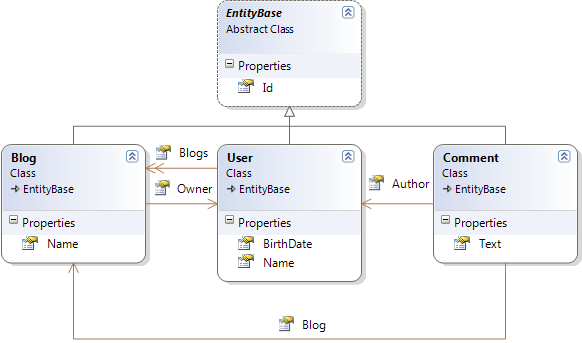
Теперь касательно его применения. Насколько я понял ConfORM поддерживает только автомаппинг основываясь на Ваших объектах. Для примера рассмотрим следующую модель:

domain_model

Все классы наследуют EntityBase который содержит единственное свойство Id типа int.

Теперь попробуем замапить эту модель. Для этого ConfORM использует класс ObjectRelationalMapper. Использовать его можно следующим образом:

public HbmMapping GenerateMappigs()
{
    IEnumerable<Type> domainEntities = this.GetDomainEntities();
    
    ObjectRelationalMapper relationalMapper = new ObjectRelationalMapper();
    relationalMapper.TablePerConcreteClass(domainEntities); // каждый не абстрактный объкт будет замаплен на свою таблицу.

    Mapper mapper = new Mapper(relationalMapper);
    HbmMapping mapping = mapper.CompileMappingFor(domainEntities); // создание самих маппингов.

    File.WriteAllText(@"d:\mappings.xml", Serialize(mapping)); // сохраняем маппинги в файл.
    return mapping;
}

/// <summary>
/// Gets all objects that are inherited from EntityBase.
/// </summary>
private IEnumerable<Type> GetDomainEntities()
{
    Assembly domainAssembly = typeof (EntityBase).Assembly;
    IEnumerable<Type> domainEntities = from t in domainAssembly.GetTypes()
                                       where t.BaseType == typeof(EntityBase) && !t.IsGenericType
                                       select t;
    return domainEntities;
}

Наверно что-то замапилось :). Чтобы это проверить можно сохранить конфигурацию в XML виде. Для того используется метод Serialize, его реализация такова:

/// <summary>
/// Generates XML string from NHibernate mappings
/// </summary>
protected static string Serialize(HbmMapping hbmElement)
{
    var setting = new XmlWriterSettings { Indent = true };
    var serializer = new XmlSerializer(typeof(HbmMapping));
    using (var memStream = new MemoryStream())
    {
        using (var xmlWriter = XmlWriter.Create(memStream, setting))
        {
            serializer.Serialize(xmlWriter, hbmElement);
            memStream.Flush();
            byte[] streamContents = memStream.ToArray();

            string result = Encoding.UTF8.GetString(streamContents);
            return result;
        }
    }
}

Выполнив этот код, получим следующий xml:

<?xml version="1.0" encoding="utf-8"?>
<hibernate-mapping xmlns:xsi="http://www.w3.org/2001/XMLSchema-instance" xmlns:xsd="http://www.w3.org/2001/XMLSchema" namespace="Conf.Entities" assembly="Conf" xmlns="urn:nhibernate-mapping-2.2">
  <class name="User">
    <id name="Id" type="Int32">
      <generator class="hilo" />
    </id>
    <property name="Name" />
    <property name="BirthDate" />
    <bag name="Blogs" inverse="true" cascade="all,delete-orphan">
      <key column="Owner" on-delete="cascade" />
      <one-to-many class="Blog" />
    </bag>
  </class>
  <class name="Blog">
    <id name="Id" type="Int32">
      <generator class="hilo" />
    </id>
    <property name="Name" />
    <many-to-one name="Owner" />
  </class>
  <class name="Comment">
    <id name="Id" type="Int32">
      <generator class="hilo" />
    </id>
    <property name="Text" />
    <many-to-one name="Author" />
    <many-to-one name="Blog" />
  </class>
</hibernate-mapping>

В общем то для существующей базы с такими маппингами уже можно работать. Как видите по умолчанию для первичных ключей используется hilo алгоритм, для коллекций используются Bag тэги, также для связи User-Blog выставляется правило каскадирования all, delete-orphan (толи это breaking change, но кажется раньше эта настройка выглядела как all-delete-orphan) и свойства называются так же как поля в базе.

В следующих постах хочу описать как кастомизировать автоматические маппинги и сделать полностью работающий пример.

Исходники

Apr 20, 2010

WCF NHibernate управление сессией и транзакциями

В WCF службах, как и в любых других приложениях где есть БД и ORM становится вопрос об управлении жизненным циклом объектов и транзакциями. Для собственных служб мне хотелось реализовать схему как в веб приложениях, т.е. :

  • ISession живет один запрос.
  • Транзация открывается в начале запроса, и закрывается в конце.
  • В случае наличия ошибки транзакция откатывается, в обратном подтверждается.

Реализовать это можно при помощи IDispatchMessageInspector. Данный интерфейс позволяет обработать события начала и окончания запроса. Итак реализация:

public class TransactionManager : IDispatchMessageInspector
{
    public object AfterReceiveRequest(ref System.ServiceModel.Channels.Message request, System.ServiceModel.IClientChannel channel, System.ServiceModel.InstanceContext instanceContext)
    {
        SessionStorage.OpenSession();
        SessionStorage.CurrentSession.BeginTransaction(IsolationLevel.ReadCommitted);
        return null;
    }
    
    public void BeforeSendReply(ref System.ServiceModel.Channels.Message reply, object correlationState)
    {
        var session = SessionStorage.CurrentSession;

        if (session.Transaction.IsActive)
        {
            if (reply.IsFault)
            {
                session.Transaction.Rollback();
            }
            else
            {
                session.Transaction.Commit();
            }
        }
    }
}

Чтобы зарегистрировать TransactionManager нам потребуется еще два вспомогательных класса. 1й добавит TransactionManager к службе:

public class TransactionBehaviour : IEndpointBehavior
{
    public void AddBindingParameters(ServiceEndpoint endpoint, BindingParameterCollection bindingParameters)
    {
    }

    public void ApplyClientBehavior(ServiceEndpoint endpoint, ClientRuntime clientRuntime)
    {
        throw new Exception("Behavior not supported on the consumer side!");
    }

    public void ApplyDispatchBehavior(ServiceEndpoint endpoint, EndpointDispatcher endpointDispatcher)
    {
        TransactionManager inspector = new TransactionManager();
        endpointDispatcher.DispatchRuntime.MessageInspectors.Add(inspector);
    }

    public void Validate(ServiceEndpoint endpoint)
    {
    }
}

Второй будет использоваться для регистрации секции в конфигурационном файле:

public class TransactionBehaviorExtensionElement : BehaviorExtensionElement
{
    protected override object CreateBehavior()
    {
        return new TransactionBehaviour();
    }
    
    public override Type BehaviorType
    {
        get
        {
            return typeof(TransactionBehaviour);
        }
    }
}

И последний штрих – настройка самого сервиса где все это собирается воедино:

<system.serviceModel>
  <services>
    <service name="WcfTransactions.TestService">
      <endpoint behaviorConfiguration="transactionsEnabledBehaviour" address="" binding="basicHttpBinding" contract="WcfTransactions.ITestService"/>
      <endpoint address="mex" binding="mexHttpBinding" contract="IMetadataExchange"/>
    </service>
  </services>

  <behaviors>
    <serviceBehaviors>
      <behavior>
        <serviceMetadata httpGetEnabled="true"/>
        <serviceDebug includeExceptionDetailInFaults="true"/>
      </behavior>
    </serviceBehaviors>

    <endpointBehaviors>
      <behavior name="transactionsEnabledBehaviour">
        <transactionBehaviour />
      </behavior>
    </endpointBehaviors>
  </behaviors>
  <extensions>
    <behaviorExtensions>
      <add
        name="transactionBehaviour"
        type="WcfTransactions.Transactions.TransactionBehaviorExtensionElement, WcfTransactions, Version=1.0.0.0, Culture=neutral, PublicKeyToken=null" />
    </behaviorExtensions>
  </extensions>
</system.serviceModel>

Тут есть маленькая особенность, когда мы регистрируем behaviorExtension обязательно указывать полный путь к типу, с указанием версии, культуры и токена сборки.

Как по мне это слишком сложно и слишком много всего приходится делать. В Asp.net mvc есть ActionFilters которые позволяют сделать все тоже самое, но с помощью всего одного атрибута на контроллере. Подобных вещей для WCF я не нашел, буду рад если кто-то подскажет.

Разобраться в этом помогут только исходники :).

Apr 15, 2010

Сложные запросы через ICriteria

Недавно пришлось сделать довольно таки интересный запрос с использованием NHibernate Criteria API. Думаю пример будет полезен в блоге. Итак рассмотрим следующую доменную модель:

1 

Есть покупатель, у которого может быть много заказов, каждый из которых может содержать несколько продуктов.

Допустим, что необходимо построить страницу поиска, на которой можно запросить пользователей по следующим критериям:

  1. Имя пользователя
  2. Количество заказов
  3. Общая сумма оплат по всем заказам

Для такого построения запроса я буду использовать следующий класс:

public class SearchCriteria
{
    public string UserName { get; set; }

    public int PageSize { get; set; }

    public int PageNumber { get; set; }

    public int? OrdersNumber { get; set;}

    public double? MinPayedMoney { get; set; }

    public double? MaxPayedMoney { get; set; }
}

Он содержит текущие условия поиска. Итак начнем. Самое простое что можно реализовать это поиск по имени пользователя:

Customer customerAlias = null;  // понадобится позже
var criteria = Global.CurrentSession.CreateCriteria(typeof(Customer), () => customerAlias);

if (!string.IsNullOrEmpty(searchCriteria.UserName))
{
    criteria.Add(SqlExpression.Like<Customer>(x => x.Name, searchCriteria.UserName, MatchMode.Anywhere));
}
criteria.SetMaxResults(searchCriteria.PageSize);
criteria.SetFirstResult(searchCriteria.PageSize * (searchCriteria.PageNumber - 1));

return criteria.List<Customer>();

Ничего интересного. Теперь добавим поиск по количеству товаров. Для этого необходимо будет использовать подзапрос. Делается это следующим образом:

if (searchCriteria.OrdersNumber.HasValue)
{
    ICriteria ordersCriteria = criteria.CreateCriteria<Customer>(x => x.Orders);

    DetachedCriteria computersCount = DetachedCriteria.For<CustomersOrder>();
    computersCount.SetProjection(Projections.RowCount());
    computersCount.Add<CustomersOrder>(x => x.Customer.Id == customerAlias.Id);

    ordersCriteria.Add(Subqueries.Eq(searchCriteria.OrdersNumber.Value, computersCount));
}

Для того, чтобы Nhibernate правильно выполнил join таблиц, мы используем customerAlias. В 6й строке мы указываем на то, что нас интересуют только заказы данного пользователя, а не общее количество заказов в таблице.

Подобным же образом необходимо сделать и запрос на общую сумму выплат:

DetachedCriteria payedAmout = DetachedCriteria.For<OrderLine>();
payedAmout.SetProjection(LambdaProjection.Sum<OrderLine>(x => x.TotalPrice));
payedAmout.CreateCriteria<OrderLine>(x => x.CustomersOrder)
    .Add<CustomersOrder>(x => x.Customer.Id == customerAlias.Id);

if (searchCriteria.MinPayedMoney.HasValue)
{
    criteria.Add(Subqueries.Lt(searchCriteria.MinPayedMoney, payedAmout));
}

if (searchCriteria.MaxPayedMoney.HasValue)
{
    criteria.Add(Subqueries.Gt(searchCriteria.MaxPayedMoney, payedAmout));
}

Собрав все воедино Nhibernate выполнит следующий SQL запрос:

SELECT top 20 this_.Id                as Id1_1_,
              this_.Name              as Name1_1_,
              customerso1_.Id         as Id3_0_,
              customerso1_.OrderDate  as OrderDate3_0_,
              customerso1_.CustomerId as CustomerId3_0_
FROM   Customers this_
       inner join CustomersOrders customerso1_
         on this_.Id = customerso1_.CustomerId
WHERE  this_.Name like '%test%' /* @p0 */
       and 2 /* @p1 */ = (SELECT count(* ) as y0_
                  FROM   CustomersOrders this_0_
                  WHERE  this_0_.CustomerId = this_.Id)
       and 100 /* @p2 */ < (SELECT sum(this_0_.TotalPrice) as y0_
                  FROM   OrderLines this_0_
                         inner join CustomersOrders customerso1_
                           on this_0_.CustomersOrderId = customerso1_.Id
                  WHERE  customerso1_.CustomerId = this_.Id)
       and 500 /* @p3 */ > (SELECT sum(this_0_.TotalPrice) as y0_
                  FROM   OrderLines this_0_
                         inner join CustomersOrders customerso1_
                           on this_0_.CustomersOrderId = customerso1_.Id
                  WHERE  customerso1_.CustomerId = this_.Id)

Обратите внимание на inner join в 7й строке. Если пользователь выполнил больше одного заказа, то в результате запроса SQL Server вернет столько строк, сколько заказов у пользователя. Чтобы избежать этого, необходимо добавить Distinct:

criteria.SetProjection(
                Projections.Distinct(
                    Projections.ProjectionList().Add(LambdaProjection.Property<Customer>(x => x.Id), "Id")
                                                .Add(LambdaProjection.Property<Customer>(x => x.Name), "Name")));

Теперь приведу весь код:

Customer customerAlias = null;  
var criteria = Global.CurrentSession.CreateCriteria(typeof(Customer), () => customerAlias);

if (!string.IsNullOrEmpty(searchCriteria.UserName))
{
    criteria.Add(SqlExpression.Like<Customer>(x => x.Name, searchCriteria.UserName, MatchMode.Anywhere));
}

if (searchCriteria.OrdersNumber.HasValue)
{
    ICriteria ordersCriteria = criteria.CreateCriteria<Customer>(x => x.Orders);

    DetachedCriteria computersCount = DetachedCriteria.For<CustomersOrder>();
    computersCount.SetProjection(Projections.RowCount());
    computersCount.Add<CustomersOrder>(x => x.Customer.Id == customerAlias.Id);

    ordersCriteria.Add(Subqueries.Eq(searchCriteria.OrdersNumber.Value, computersCount));
}

DetachedCriteria payedAmout = DetachedCriteria.For<OrderLine>();
payedAmout.SetProjection(LambdaProjection.Sum<OrderLine>(x => x.TotalPrice));
payedAmout.CreateCriteria<OrderLine>(x => x.CustomersOrder)
    .Add<CustomersOrder>(x => x.Customer.Id == customerAlias.Id);

if (searchCriteria.MinPayedMoney.HasValue)
{
    criteria.Add(Subqueries.Lt(searchCriteria.MinPayedMoney, payedAmout));
}

if (searchCriteria.MaxPayedMoney.HasValue)
{
    criteria.Add(Subqueries.Gt(searchCriteria.MaxPayedMoney, payedAmout));
}

criteria.SetProjection(
    Projections.Distinct(
        Projections.ProjectionList().Add(LambdaProjection.Property<Customer>(x => x.Id), "Id")
                                    .Add(LambdaProjection.Property<Customer>(x => x.Name), "Name")));

criteria.SetMaxResults(searchCriteria.PageSize);
criteria.SetFirstResult(searchCriteria.PageSize * (searchCriteria.PageNumber - 1));

criteria.SetResultTransformer(Transformers.AliasToBean<Customer>());

return criteria.List<Customer>();

Данный код формирует следующий SQL запрос:

SELECT distinct top 20 this_.Id   as y0_,
                       this_.Name as y1_
FROM   Customers this_
       inner join CustomersOrders customerso1_
         on this_.Id = customerso1_.CustomerId
WHERE  this_.Name like '%test%' /* @p0 */
       and 2 /* @p1 */ = (SELECT count(* ) as y0_
                  FROM   CustomersOrders this_0_
                  WHERE  this_0_.CustomerId = this_.Id)
       and 100 /* @p2 */ < (SELECT sum(this_0_.TotalPrice) as y0_
                  FROM   OrderLines this_0_
                         inner join CustomersOrders customerso1_
                           on this_0_.CustomersOrderId = customerso1_.Id
                  WHERE  customerso1_.CustomerId = this_.Id)
       and 500 /* @p3 */ > (SELECT sum(this_0_.TotalPrice) as y0_
                  FROM   OrderLines this_0_
                         inner join CustomersOrders customerso1_
                           on this_0_.CustomersOrderId = customerso1_.Id
                  WHERE  customerso1_.CustomerId = this_.Id)

Код выглядит как по мне страшновато. Но с другой стороны LINQ реализация врядли была бы проще. Все равно пришлось бы использовать синтаксис через extension методы и лямбда выражения.

Тут конечно можно еще кое что оптимизировать, но цель поста была показать как строить сложные запросы при помощи NHibernate. Надеюсь это поможет.

Mar 30, 2010

AdoNetBatchSize и StatelessSession

Для выполнения bulk операций над базой данных в NHibernate есть специальная StatelessSession. Интерфейс данного объекта отличается от стандартного Session, у него нет методов Save, SaveOrUpdate и т.д., зато есть Insert, Update, Delete.

Особенность StatelessSession в том, что она не следит за сохранёнными объектами, значит это следующее, рассмотрим следующий пример кода:

using(var transaction = Session.BeginTransaction())
{
    var someObject = Session.Get<SomeObject>(id);
    someObject.SomeProperty = "some new value";
    transaction.Commit();
}

В результате выполнения этого кода someObject будет обновлен не только в вашем приложении, но в и базе данных.

За подобное приходится платить производительностью, в частности именно это стало причиной того, что на OrmBattle Nhibernate получает далеко не самые лучшие отметки (кстати по этому поводу есть довольно хороший ответ от Ayende).

А теперь перейдем к основной теме. Показать хотелось бы следующее:

ISessionFactory sessionFactory = Fluently.Configure()
                                         .Database(MsSqlConfiguration.MsSql2008.ConnectionString("connString")
                                         .AdoNetBatchSize(40))  // important!
                                         .Mappings(x=>x.FluentMappings.AddFromAssemblyOf<TestHilo>())
                                         .BuildSessionFactory();

IStatelessSession session = sessionFactory.OpenStatelessSession();

for (int i = 0; i < 60; i++)
{
    var testHilo = new TestHilo
    {
        Field1 = "field" + i, 
        Field2 = i
    };

    session.Insert(testHilo);
}

session.Dispose();

Данный код должен вставить 60 записей в базу. На самом же деле вставится только 40. Происходит это из-за установленного AdoNetBatchSize (подробнее об этом в предыдущем посте). Когда это обнаружилось первое что захотелось сделать это вызвать session.Flush(). Но у StatelessSession нет такого метода :).

В общем решением будет следующее – выполнять данный цикл в рамках одной транзацкии:

using (ITransaction transaction = session.BeginTransaction())
{
    for (int i = 0; i < 60; i++)
    {
        var testHilo = new TestHilo
                                {
                                    Field1 = "field" + i,
                                    Field2 = i
                                };

        session.Insert(testHilo);
    }

    transaction.Commit();
}

Такой код вставит все 60 записей.

Feb 19, 2010

Ado net batch size и идентификаторы

Для оптимизации большого количества insert-update команд NHiberante содержит специальную настройку – Ado net batch size. Рассмотрим следующий код:

for (int i = 0; i < 5000; i++)
{
    var testIncrement = new SomeEntity
                            {
                                Field1 = "field" + i, 
                                Field2 = i
                            };

    session.SaveOrUpdate(testIncrement);
} 

Какое количество запросов будет сделано к базе данных? Ответ зависит от двух условий:

  1. Установлен ли параметр ado net batch size
  2. Какой алгоритм используется для генерирования Id сущностей

Ну по поводу первого в общем то ясно – этот параметр отвечает за то, сколько запросов NHibernate объеденит в один и выполнит в один заход.

А вот о Id стоит сказать немного больше. Лично я до последнего времени во всех приложениях использовал автоинкрементные поля в Sql Server. Делалось это как наиболее простой выход для генерирования Id – в маппинге достаточно было указать GenearatedBy.Native() и все. В общем то мне никогда этот поход не мешал и вполне выполнял нужные мне задачи.

Такой же подход применялся в проекте Sharp Arhitecture… До релиза в третьем квартале 2009года :). Там алгоритмом по умолчанию установлен алгоритм hilo. Подробности этого алгоритма можно почитать по соответствующей ссылке. Основная идея заключается в следующем, когда надо получить происходит примерно следующее:

  1. В базе данных существует спец. таблица, которая хранит hi величину, это обычное число. NHiberante получает его.
  2. Nhibernate в зависимости от настроек выбирает следующую hi величину. Предположим текущее hi – 1000, а следующее 2000.
  3. Получив hi=1000 и выставив в базе данных next hi = 2000 Nhibernate в праве создавать сущности в id = 1001, 1002, 1003 и т.д.

Соответственно если каждый клиент будет обновлять hi величину, то никто из клиентов не получит одинаковые id для объектов. Для Oracle хранилищем hi значений возможно могут быть последовательности, которых нет в Sql Server.

Все это длинное описание ради того, чтобы было понятно происходящее в примере в строке 9. Как только NHibernate выполнит команду SaveOrUpdate сущность testIncrement должна получить Id. Если в качестве id используется автоинкрементное поле, то каждое такое сохранение необходимо фиксировать в базе, т.е. выполнять запрос Insert (иначе нельзя получить id). В случае же использования hilo алгоритма NHiberante может сохранить нужное количество объектов, при этом самостоятельно генерируя Id.

В общем выставив ado net batch size = 40 и выполнив код, приведенный в начале получил следующие результаты:

  • autoincrement – 5000 запросов (как и ожидалось),
  • hilo – 225.

Feb 5, 2010

NHibernate и Castle Windsor. Session per web request

Как известно основными объектами, с которыми приходится работать в NHibernate это Session и SessionFactory. При этом SessionFactory должен быть один на все приложение, поскольку его создание обходится дорого, а Session – дешевый для создания объект.

Можно рассмотреть следующий вариант, объект Session создается по необходимости – т.е. на каждый запрос к базе мы получаем новый экземпляр сессии. Но в этом сценарии мы теряем кеш первого уровня, получаем сложности с транзакциями и т.д. Наиболее распространен подход Session Per Web Request. В этом случае сессия создается в начале обработки запроса, и удаляется по завершению.

В этом посте я покажу как очень просто реализовать это с использованием Castle Windsor. Для этого добавляем один класс, который будет отвечать за конфигурацию SessionFactory:

public class NHibernateConfiguration
{
    public ISessionFactory CreateSessionFactory()
    {
        FluentConfiguration configuration = Fluently.Configure()
                                                    .Database(MsSqlConfiguration.MsSql2008.ConnectionString(cs=>cs.FromConnectionStringWithKey("dbConnection")))
                                                    .Mappings(m=>m.FluentMappings.AddFromAssemblyOf<CategoryMap>());

        return configuration.BuildSessionFactory();
    }
}

Далее, добавив ссылки на Castle.Core, Castle.MicroKernel и Castle.Windsor создаем класс, который настроит правила работы с SessionFactory и Session:

public static class ServiceLocaterInitializer
{
    /// <summary>
    /// Initializes Castle Windsor.
    /// </summary>
    public static void Init()
    {
        IWindsorContainer container = new WindsorContainer();
        container.AddFacility<FactorySupportFacility>();
        container.Register(Component.For<ISessionFactory>()
                               .LifeStyle.Singleton
                               .UsingFactoryMethod(() => new NHibernateConfiguration().CreateSessionFactory()));

        container.Register(Component.For<ISession>()
                               .LifeStyle.PerWebRequest
                               .UsingFactoryMethod(kernel => kernel.Resolve<ISessionFactory>().OpenSession()));
    }
}

Чтобы это заработало необходимо добавить http модуль в веб конфиге:

<add name="PerRequestLifestyle" type="Castle.MicroKernel.Lifestyle.PerWebRequestLifestyleModule, Castle.MicroKernel" />

Далее, чтобы получить объект Session достаточно сделать следующий вызов:

var session = container.Resolve<ISession>();

Жизненным циклом объектов Castle будет управлять сам.

Jan 12, 2010

Маппинг деревьев в NHibernate

Доменная модель

В посте о связях в NHibernate поступило пожелание увидеть пост о древовидных структурах и как с ними работать в NHiberante. Как правило такие структуры мне приходилось строить для категорий, на них и будем смотреть. Начнем с чистой доменной модели:

public class Category
{
    private ISet<Category> childCategories;
    private Category parentCategory;

    public Category()
    {
        childCategories = new HashedSet<Category>();
    }

    public virtual int Id { get; protected set; }

    public virtual string Name { get; set; }

    public virtual ReadOnlyCollection<Category> ChildCategories
    {
        get
        {
            return new ReadOnlyCollection<Category>(new List<Category>(childCategories));
        }
    }

    public virtual Category ParentCategory
    {
        get
        {
            return parentCategory;
        }
    }

    public virtual void AddChildCategory(Category category)
    {
        if (category == null) throw new ArgumentNullException("category");
        childCategories.Add(category);
    }

    public virtual void SetParentCategory(Category category)
    {
        if (category == null) throw new ArgumentNullException("category");
        parentCategory = category;
    }
}

Каждая категория содержит ссылку на своего родителя и содержит список дочерних категорий. На данный момент модель не представляет никакой гарантии того, что дерево действительно будет деревом. Что я имею ввиду: если есть следующая вложенность: “Parent” –> “Child” -> “Child of Child”. Доменная модель никаким образом не запретит следующий код: Category(“Child Of Child”).AddChildCategory(“Parent”). Это создаст цикл и никакие рекурсивные алгоритмы без дополнительных действий работать не будут.

Чтобы избежать подобной ситуации в методы SetParentCategory и AddChildCategory можно добавить логику проверки добавляемых категорий. Так добавляя подкатегорию можно проверить что она уже не содержится в данной иерархии и т.д.

Маппинг

Теперь обратимся к Nhibernate. Маппинг для данного класса будет следующим:

public class CategoryMap : ClassMap<Category>
{
    public CategoryMap()
    {
        Id(x => x.Id).GeneratedBy.Native();

        Map(x => x.Name)
            .Length(200)
            .Not.Nullable();

        References(x => x.ParentCategory)
            .Column("ParentCategoryId")
            .Access.CamelCaseField();

        HasMany(x => x.ChildCategories)
            .Cascade.AllDeleteOrphan()
            .AsSet()
            .KeyColumn("ParentCategoryId")
            .Access.CamelCaseField();
    }
}

По маппингу можно сгенерировать следующую таблицу:

Таблица категорий

В общем ничего необычного. Для создания категорий можно использовать следующий код:

using (var transaction = Global.CurrentSession.BeginTransaction())
{
    Category parent = new Category();
    parent.Name = "parent";

    Category child = new Category();
    child.Name = "child";

    parent.AddChildCategory(child);

    Category childOfTheChild = new Category();
    childOfTheChild.Name = "child of the child";

    child.AddChildCategory(childOfTheChild);

    Global.CurrentSession.SaveOrUpdate(parent);
    transaction.Commit();
}

Поскольку в маппингах установлено каскадирование AllDeleteOrphan то достаточно только сохранения родительской категории. Так же это позволяет управлять поведением в случае удаления. Категория, родитель которой в данный момент удаляется будет удалена вместе с родительской. Если такое поведение вам не нужно, смените тип каскадирования на All.

Немного о производительности

Вопросы выборок иерархических структур сложны в самом SQL. Если оставить все как есть, то Nhibernate будет работать в режиме обычного lazy load и вытаскивать каждую коллекцию подкатегорий отдельным запросом. Для примера следующий код:

protected void Button1_Click(object sender, EventArgs e)
{
    ICriteria criteria = Global.CurrentSession.CreateCriteria(typeof (Category));
    criteria.Add(Restrictions.IsNull("ParentCategory"));
    foreach (Category category in criteria.List<Category>())
    {
        EnumerateChilds(category);
    }
}

protected void EnumerateChilds(Category category)
{
    foreach (Category childCategory in category.ChildCategories)
    {
        EnumerateChilds(childCategory);
    }
}

Тут вытаскиваются все родительские категории, и мы пробегаемся по всем дочерним. Если существует следующая вложенность: “Category”->”Child Category”->”Child of child category”, то данный код выполнит запросы:

-- Выбираем родительскую категорию 
SELECT this_.Id as Id0_0_, 
       this_.Name as Name0_0_, 
       this_.ParentCategoryId as ParentCa3_0_0_ 
FROM [Category] this_ 
WHERE this_.ParentCategoryId is null
-- Выборка подкатегорий каждой из категорий 
SELECT childcateg0_.ParentCategoryId as ParentCa3_1_, 
       childcateg0_.Id as Id1_, 
       childcateg0_.Id as Id0_0_, 
       childcateg0_.Name as Name0_0_, 
       childcateg0_.ParentCategoryId as ParentCa3_0_0_ 
FROM [Category] childcateg0_ 
WHERE childcateg0_.ParentCategoryId=@p0   /* @p0=4 */

SELECT childcateg0_.ParentCategoryId as ParentCa3_1_, 
       childcateg0_.Id as Id1_, 
       childcateg0_.Id as Id0_0_, 
       childcateg0_.Name as Name0_0_, 
       childcateg0_.ParentCategoryId as ParentCa3_0_0_ 
FROM [Category] childcateg0_ 
WHERE childcateg0_.ParentCategoryId=p0    /* @p0=5 */

SELECT childcateg0_.ParentCategoryId as ParentCa3_1_, 
       childcateg0_.Id as Id1_, 
       childcateg0_.Id as Id0_0_, 
       childcateg0_.Name as Name0_0_, 
       childcateg0_.ParentCategoryId as ParentCa3_0_0_ 
FROM [Category] childcateg0_ 
WHERE childcateg0_.ParentCategoryId=@p0   /* @p0=6 */

Как правило категории нужно доставать все сразу, чтобы построить красивое дерево для навигации. На своем блоге Oren Eini показал как можно оптимизировать выборку дерева. Сделать это можно следующим запросом:

var categories = Global.CurrentSession
                       .CreateQuery("select c from Category c join fetch c.ChildCategories")
                       .SetResultTransformer(new DistinctRootEntityResultTransformer())
                       .List<Category>(); 

Данный вариант кода выполнит меньше запросов, но выполнит по одному лишнему на каждую категорию, последнюю в иерархии. Т.е. категория, у которой нет подкатегорий сгенерирует еще один запрос к базе. В частности у меня было 2 такие категории, и были выполнены следующие запросы:

-- statement #1
select category0_.Id                 as Id0_0_,
       childcateg1_.Id               as Id0_1_,
       category0_.Name               as Name0_0_,
       category0_.ParentCategoryId   as ParentCa3_0_0_,
       childcateg1_.Name             as Name0_1_,
       childcateg1_.ParentCategoryId as ParentCa3_0_1_,
       childcateg1_.ParentCategoryId as ParentCa3_0__,
       childcateg1_.Id               as Id0__
from   [Category] category0_
       inner join [Category] childcateg1_
         on category0_.Id = childcateg1_.ParentCategoryId

-- statement #2
SELECT childcateg0_.ParentCategoryId as ParentCa3_1_,
       childcateg0_.Id               as Id1_,
       childcateg0_.Id               as Id0_0_,
       childcateg0_.Name             as Name0_0_,
       childcateg0_.ParentCategoryId as ParentCa3_0_0_
FROM   [Category] childcateg0_
WHERE  childcateg0_.ParentCategoryId = 8 /* @p0 */

-- statement #3
SELECT childcateg0_.ParentCategoryId as ParentCa3_1_,
       childcateg0_.Id               as Id1_,
       childcateg0_.Id               as Id0_0_,
       childcateg0_.Name             as Name0_0_,
       childcateg0_.ParentCategoryId as ParentCa3_0_0_
FROM   [Category] childcateg0_
WHERE  childcateg0_.ParentCategoryId = 10 /* @p0 */

8я и 10я категории не содержат подкатегорий. Данный вопрос обсуждается в группе NHUsers. Ответов почему это происходит, равно как и решения задачи там пока не обнаружилось. Так что не факт что выполнив такой запрос Вы уменьшите нагрузку на базу.

Такое же поведение наблюдается если выключить lazy load и поставить fetch-mode=”join”.

Еще одна проблема с этим это то, что он исключает категории, у которых есть родитель, но нет подкатегорий. Соответственно если вложенность больше одного уровня, вы получите лишние результаты.

Поэтому я бы предпочел использовать стандартный lazy load до тех пор, пока это не станет реальной проблемой для производительности. Как только станет заметно тормозить, то оптимизировать, либо хранимкой, либо еще как.

Пример кода.

Dec 25, 2009

Fluent NHibernate. Маппинг наследования

Гугл подсказал мне, что блог находят в основном при поиске того, как замапить различные виды наследования используя Fluent Nhibernate. Попробую осветить этот вопрос.

Nhibernate поддерживает 3 способа реализации наследования. Различаются они количеством необходимых для этого таблиц. Далее будут рассмотрены 2 из них подробнее.

Table per class hierarchy

В данной схеме для всей иерархии классов используется одна таблица. Рассмотрим пример со следующей моделью:

image

Для хранения такой структуры будет достаточно одной таблицы с полями Id, Name, UploadDate, WhoIsOnPicture, Lenght, Type. Стоит обратить внимание на то, что поле Type используется Nhibernate’ом для того, чтобы узнать какой конкретный тип находится в конкретной строке. Итак маппинг будет выглядеть следующим образом:

public class ContentMapping: ClassMap<Content>
{
    public ContentMapping()
    {
        Id(x => x.Id).GeneratedBy.Native();
        Map(x => x.Name).Length(200).Not.Nullable();
        Map(x => x.UploadDate).Not.Nullable();
        DiscriminateSubClassesOnColumn("ContentType");
    }
}

public class PhotoMapping : SubclassMap<Photo>
{
    public PhotoMapping()
    {
        Map(x => x.WhoIsOnPicture);
        DiscriminatorValue("Photo");
    }
}

public class VideoMapping: SubclassMap<Video>
{
    public VideoMapping()
    {
        Map(x => x.Length);
        DiscriminatorValue("Video");
    }
}

Генерируемый XML довольно громоздкий, и полностью приводить его я не буду. Важно лишь то, что сформирован маппинг, и в нем используются теги subclass для photo и video.

Недостатком данной схемы является то, что в таблице Content колонки WhoIsOnPicture и Length обязательно должны позволять сохранять NULL.

Table per subclass

Очень радует, что для того, чтобы использовать этот подход, достаточно просто убрать упоминания Discriminator из классов, маппинг будет абсолютно таким же:

public class ContentMapping: ClassMap<Content>
{
    public ContentMapping()
    {
        Id(x => x.Id).GeneratedBy.Native();
        Map(x => x.Name).Length(200).Not.Nullable();
        Map(x => x.UploadDate).Not.Nullable();
    }
}
public class PhotoMapping : SubclassMap<Photo>
{
    public PhotoMapping()
    {
        Map(x => x.WhoIsOnPicture);
    }
}
public class VideoMapping : SubclassMap<Video>
{
    public VideoMapping()
    {
        Map(x => x.Length);
    }
}

Этот маппинг приведет к использованию joined-subclass элементов.