Jan 6, 2011

Episerver CMS 6 search

Had to make some additional staff in EPiServer search functionality. I had to add ability to filter pages by category, page type, and keyword in content. Firstly I have tried to do it with DataFactory.Instance.FindPagesWithCriteria method. But the thing is that I couldn’t  find a way to filter data by search keyword.

I knew that SearchDataSource does this somehow and wanted to reuse that logic. But when I looked at it in reflector, I found a method 100 lines long doing some really fancy staff to make select by keywords. So the best way to make search that I need is to do it through SearchDataSource.

Fortunately it provides public property called Criteria. It is a criteria that are going to be passed for underlying DataFactory.FindPagesWithCriteria call.

So the search that I needed could be implemented in the this way. Aspx part:

<EPiServer:SearchDataSource ID="uiSearchDataSource" runat="server" EnableVisibleInMenu="false"
                            PageLink="<%# PageReference.StartPage %>">
    <SelectParameters>
        <asp:QueryStringParameter Name="SearchQuery" QueryStringField="search" DefaultValue="" />
    </SelectParameters>
</EPiServer:SearchDataSource>

And in code behind:

var pageTypeCategory = new PropertyCriteriaControl(new PropertyCriteria
                            {
                                Condition = CompareCondition.Equal,
                                Name = "PageTypeID",
                                Type = PropertyDataType.PageType,
                                Value = PageType.Load("Article").ID.ToString(),
                                Required = true
                            });

var pageTypeCategory1 = new PropertyCriteriaControl(new PropertyCriteria
                            {
                                Condition = CompareCondition.Equal,
                                Name = "PageCategory",
                                Type = PropertyDataType.Category,
                                Value = Category.Find("category2").ID.ToString(),
                                Required = true
                            });

this.uiSearchDataSource.Criteria.Add(pageTypeCategory);
this.uiSearchDataSource.Criteria.Add(pageTypeCategory1);

Note that Name property of each criteria should be as shown in code above, otherwise it won’t work. Hope it helps someone!

Nov 29, 2010

TFS for the SVN user

Originally I wanted to name this post as Making your life a little bit easier with all TFS horror and then decided to change it. The reason for changing title is that my irritation on TFS was called only by VisualSVN usability. I spoke with people who are using TFS for long period and have never used any other tools and they say that it is really good and everything is just obvious. Obvious for them, but not for me.

Currently I have no choice except using TFS as a source control system.  Previously I used Subversion with VisualSVN add-in to integrate with visual studio.

The only way for me not to go crazy while doing really simple tasks with TFS (like commit, merging) was making some configurations. Maybe some tips will save someone's time. So lets start with them one by one.

Merging tool

First of all when you merge conflicts with build in merging tool you really won’t understand what has changed. Changes are shown only in rows. So if one symbol is change you will need to hunt it in entire row by yourself. Also it is hard for me to see where conflict was resolved successfully with no need for me to do something and where my assistance is required.

Now I’m using WinMerge tool. Its also not the best, but really better then default one. To configure it you need to go to the Tools->Options->Source Control->Visual Studio Team Foundation Server and click Configure User Tools button. Click Add… button to add new command.

User tool configuration window

Select Compare operation, provide to WinMerge and fill arguments with this value: /ub /dl %6 /dr %7 %1 %2.

Click ok and add another new command select Merge, provide WinMerge path and fill arguments: /ub /dl %6 /dr %7 %1 %2 %4. Click Ok.

Here is a post where described how to configure TFS with other tools.

Compare on double click

Another really annoying thing is that when you are about to commit all your changes and you double click on a file it is just opened (in Notepad as I rememer O_O). Why would anyone need to see his pending change file in notepad? To compare it with server version you need to click on special buttons:

Checkin pending changes dialog

I didn’t want to pixel hunt that buttons. I wanted to compare with latest version on double mouse click. The good news that it is possible with TFS. How to configure it you can read here (btw the only option that worked for me is with registry and only after reboot).

Ghost changes

My favourite trick with TFS is just go to WebForm1.aspx press space somewhere and hit ctrl+z. You even didn’t hit save. Then you can open pending changes dialog and there real surprise is waiting for you. TFS will say that you have 3 pending changes Open-mouthed smile. Wow, when I saw this for the first time I couldn’t believe my eyes!

Ofcourse  when you click Check In button it will check real changes in the file and won’t commit file with empty changes. But I used to look through all changes that I’m going to commit and don’t want to hunt for really changed files among rest of them.

To solve this TFS power tools can be used. They contain a lot of useful features and one of them is TFPT.EXE tool. It is command line utility and can do a lot of stuff that you usually do with interface. And guess what? This tool has a special command to roll back unchanged files.

I added this tool as an external tool. To do this you can do the following go to the Tools->External Tools and click Add button. There you need to fill all the fields like this:

external tools configuration

I named the command as undo. You can name it the way you want. After you do it in Tools menu new option will be added:

undo

When clicked following output will be shown for me:

undo results

Auto merge

Another reason why you would want to install power tools is auto merge all button.

automerge all

The thing is: when you update, even if TFS is able to merge changes by himself it will force you to hit auto merge, auto merge, auto merge on each conflicted file. With this button you can do it in one place for all files. If somebody knows how to force it auto merge when possible without me clicking something I would really appreciate your help.

Remembering credentials

It won’t be an issue for the most of the TFS users, but it was for me.

Our TFS server is located in a different active directory domain. And each time you open a solution it asks you for the credentials and has no option to save them. I found this question on the msdn. The solution that worked for me is:

  1. Open start menu and in the quick search find for “manage network passwords” (in Russian version of windows you need to look for “управление сетевыми паролями”)
  2. In the opened window click on Add a Windows credential
  3. Fill all the required fields and click ok (server name should be provided with no http or something else, just name)

After doing this Visual Studio won’t ask password.

Unshelve with merge

I didn’t really used this feature of power tools yet. But as I was told default unshelving functionality will just replace all the files in your working copy. And if time has passed since you shelved all changes will be lost. Power tools allows you to merge changes and not just override.

So I think that those are all the configurations that I have made for today. It I remember something else I’ll write a new post.

Nov 11, 2010

Don't use constants

I don’t really remember when, but inside my current team I have told that I really hate to see classes that are like this:

public class Contants
{    
    public class Settings
    {
        public const ConnectionStringName = "SomeProject.ConnectionString";    
    }
    public class FieldNames
    {
        public const SomeField = "MyField";
    }
}

Almost all of the projects that I saw had this kind of class. Usage of it seams to be obvious – to store reusable strings to remove repetition.

But for me such a classes are lacking of the one thing – intention. Each constant exists inside our application for some reason and Constants class completely removes context that is connected to its value.

Today we had a some kind of “real world” scenario where I can show what to do with constants. I our case we had an email template where system will substitute some user input. So template contains %UserName%, %Reason% and so force string patterns that are going to be replaced with some values. The most obvious storage for these patterns is Constants class, but we don’t want it :)! So what I think we should do is to create a set of extension methods like this:

static class StringExtensions
{
    public static string SubstituteUserName(this string template, string userName)
    {
        return template.Replace("%UserName%", userName);
    }
}

This approach will allow us easily to write unit tests, because method is separated from others and really simple, and it will allow to write code in the following way:

"Hello %UserName%, thanks for your message about %Reason%"
                      .SubstituteUserName(userName)
                      .SubstituteReason(reason);

I think its really readable and looks nice.

The next thing why such an approach works is the way how developer works with the legacy code. In legacy system it is really often for developer to perform text based search to find places where similar tasks were already solved. For example when you need to get some value from the web.config file you can either use ConfigurationManager or WebConfigurationManager or maybe in your project some custom wrapper is implemented. For me the easiest way to find such information is to grab existing key of some value and try find all the references on it. In the good project you will meet only one place of usage :). In other cases it may be two places – Constants class and some domain specific wrapper (in this case why do need this constant separately of its usage?). But if you find that this constant is reused in 100 places and there is no common pattern you will just add the 101th place and forget about it. The reason why that happened is the existence of this Constans class.

So my approach for constants is that they can be only private in some classes that are using them. This allows new developers easy way to understand why those values are here and how to use them.

Nov 2, 2010

ConfOrm nice column naming conventions

I have decided to write all further posts in English. The reason for that is simple – when I try to find something related to programming topics I always use English. I think most people do the same.

The next step of learning ConfOrm for me was creation of sharp-architecture like conventions for table and column mappings.  I even wrote some pattern appliers, but when ManyToMany turn has came I had to google a bit. And the result was that Conform.Shop already implemented everything that I wanted so this post will be about usage of this library and the next one about implementation of your own appliers.

To create your own naming conventions we need to understand overall process. Basically mapping in ConfOrm  consists of two major steps:

  1. Getting the domain entities. This is done with the help of ObjectRelationalMapper class. This class is responsible for creating all the entities and associations between them. So is you want to change association type, or remove some property from the mappings this a place where you should do it.
  2. Creating mappings. Mapper class is responsible here. If you want to provide tables, columns and other conventions this is the right place.

Lets begin with domain model:

domain model 

Simple but with some associations.

Probably the easiest way to understand how NHibernate is configured is to look at XML (ConfOrm doesn't generate XML, but you can get it with this approach). So lets check User entity map:

<class name="User">
  <id name="Id" type="Int32">
    <generator class="native" />
  </id>
  <property name="FirstName" />
  <property name="LastName" />
  <property name="VeryLongProperty" />
  <set name="Orders" inverse="true" cascade="all,delete-orphan">
    <key column="User" on-delete="cascade" />
    <one-to-many class="Order" />
  </set>
</class>

The first thing that I want to change is the table name. I want it to be plural. To do this all that is required to do the following:

var englishInflector = new EnglishInflector();
mapper.PatternsAppliers.Merge(
                       new ClassPluralizedTableApplier(englishInflector));

There are also SpanishInflector and ItalianInflector if somebody wants them. After adding this one we get directive table=Users and so on for all other entities.

Next thing that I don’t like is names for column in the <key property. To change it I need to do the following:

mapper.PatternsAppliers.Merge(
new OneToManyKeyColumnApplier(relationalMapper));

Now the mapping for the set is:

<set name="Orders" inverse="true" cascade="all,delete-orphan">
  <key column="UserId" on-delete="cascade" /> 
  <one-to-many class="Order" /> 
</set>

That is probably all that I wanted to change in User mapping. Now Lets look at the Product map:

<class name="Product" table="Products">
  <id name="Id" type="Int32">
    <generator class="native" />
  </id>
  <property name="Price" />
  <property name="Name" />
  <property name="Description" />
  <set name="Categories" table="CategoryProduct" inverse="true">
    <key column="product_key" />
    <many-to-many class="Category" column="category_key" />
  </set>
</class>

There is definitely a better way of naming columns in the joining table. To change them we need to add next appliers:

mapper.PatternsAppliers.Merge(
                      new ManyToManyColumnApplier(relationalMapper));
mapper.PatternsAppliers.Merge(
                      new ManyToManyKeyIdColumnApplier(relationalMapper));

Those will give:

<set name="Categories" table="CategoryProduct" inverse="true">
  <key column="ProductId" />
  <many-to-many class="Category" column="CategoryId" />
</set>

That is what I really wanted. So all the mappings for the domain:

var relationalMapper = new ObjectRelationalMapper();
relationalMapper.TablePerConcreteClass(domainEntities);
relationalMapper.Patterns.PoidStrategies.Add(new NativePoidPattern());
relationalMapper.Cascade<Category, Product>(Cascade.Persist);
relationalMapper.ManyToMany<Category, Product>();
relationalMapper.Cascade<Order, Product>(Cascade.Persist);

var mapper = new Mapper(relationalMapper);
var englishInflector = new EnglishInflector();
mapper.PatternsAppliers.Merge(new ClassPluralizedTableApplier(englishInflector));
mapper.PatternsAppliers.Merge(new OneToManyKeyColumnApplier(relationalMapper));
mapper.PatternsAppliers.Merge(new ManyToManyColumnApplier(relationalMapper));
mapper.PatternsAppliers.Merge(new ManyToManyKeyIdColumnApplier(relationalMapper));

So not a lot of code and settings. Also this assembly contains a lot of other very nice patterns for example ManyToManyPluralizedTableApplier after applying it table name for joining products and categories becomes  CategoriesToProducts. Just beautiful Smile.

Here is the source code for this post

So use ConfOrm!

Oct 29, 2010

Что нового в NHibernate 3

9 октября был выпущен NHibernate 3 beta 1. Решил посмотреть что в нем нового. Для этого быстренько набросал модель:

2010-10-29_1826

Для маппинга я буду использовать ConfOrm. Его настройки:

public class DomainMapper
{
    public HbmMapping GenerateMappigs()
    {
        IEnumerable<Type> domainEntities = this.GetDomainEntities();

        var relationalMapper = new ObjectRelationalMapper();
        relationalMapper.TablePerConcreteClass(domainEntities);
        relationalMapper.Patterns.PoidStrategies.Add(new NativePoidPattern());
        relationalMapper.Cascade<Category, Product>(Cascade.Persist);
        relationalMapper.ManyToMany<Category, Product>();
        relationalMapper.Cascade<Order, Product>(Cascade.Persist);

        var mapper = new Mapper(relationalMapper);
        mapper.PatternsAppliers.RootClass.Add(new TableNamesApplier());
        mapper.Class<User>(x => x.Property(y => y.VeryLongProperty, map => map.Lazy(true)));
        HbmMapping mapping = mapper.CompileMappingFor(domainEntities);
        return mapping;
    }

    /// <summary>
    /// Gets all objects that are inherited from <see cref="BaseEntity"/>.
    /// </summary>
    private IEnumerable<Type> GetDomainEntities()
    {
       Assembly domainAssembly = typeof(BaseEntity).Assembly;
       IEnumerable<Type> domainEntities = from t in domainAssembly.GetTypes()
                                          where t.BaseType == typeof(BaseEntity) && !t.IsGenericType
                                          select t;
            return domainEntities;
    }
}

В предыдущих постах говорили что стоит добавлять и схему базы данных. Скажу честно, я её не создавал, а попросил это сделать NHibernate. Поэтому я не буду её тут приводить Smile

Чтобы сгенерировать базу данных можно использовать SchemaExport:

new SchemaExport(cfg).Execute(true, true, false);

Дальше по порядку:

1. И конечно самое ожидаемое – Linq Provider

Чтобы попробовать его я решил попробовать запросы, которе прошлый провайдер (основанный на ICriteria) не мог выполнить.

  1. (from u in session.Query<User>()
    where u.Orders.Count > 5
    select u).Count()
    Выполняет следующий sql:
    select
        cast(count(*) as INT) as col_0_0_
    from
        Users user0_
    where
        (
            select
                cast(count(*) as INT)
            from
                Orders orders1_
            where
                user0_.Id=orders1_.OrderUser
        )>@p0;
    @p0 = 5 
  2. Интересно было так же посмотреть как выбираются анонимные объекты, запрос:
    var firstName = (from u in session.Query<User>()
                     select new { u.FirstName }).FirstOrDefault();
    Выполняет
    select
        TOP (@p0) user0_.FirstName as col_0_0_
    from
        Users user0_;
    @p0 = 1 [Type: Int32 (0)]
    Я думаю комментарии тут не нужны, тем более если еще вспомнить с каким количеством баз данных умеет работать NHibernate и насколько это круто Smile
  3. Но вот такой запрос уже выполнить не получилось:
     var rows = (from u in session.Query<User>()
                 let order = u.Orders.FirstOrDefault()
                 where u.Orders.Count > 5 && order != null && order.Id == 4
                 select u).ToList();

2. Fluent синтаксис для конфигурации SessionFactory

Для этого примера мне потребовалась следующая кофигурация:

DomainMapper mapper = new DomainMapper();
HbmMapping generatedMappigs = mapper.GenerateMappigs();

var cfg = new Configuration();
cfg.SessionFactory()
        .Proxy.Through<ProxyFactoryFactory>()             
        .Integrate
            .Using<MsSql2008Dialect>()
            .AutoQuoteKeywords()
            .Connected
                .By<SqlClientDriver>()
                .ByAppConfing("connectionString")
            .CreateCommands
                .ConvertingExceptionsThrough<SQLStateConverter>();
cfg.SetProperty("show_sql", "true"); // I haven't found how to configure them
cfg.SetProperty("format_sql", "true");
cfg.AddDeserializedMapping(generatedMappigs, "WhatsNew");

чтобы использовать такой синтаксис необходимо подключить неймспейс NHibernate.Cfg.Loquacious. Конечно название они выбрали... Но дословно гугл переводит как "словоохотливый". Может оно и правильно, но я раньше нигде не встречал. Наиболее полный пример всех настроек я смог найти у Fabio Maulo.

Так же конфигурировать можно с помощью лямбда выражений. Но в примере я их не использовал. Подробнее можно почитать тут.

3. QueryOver синтаксис

Это API позволяет упросить написание ICriteria запросов. Во первых больше нет необходимости использовать строки (раньше это решалось с помощью библиотеки NHLambdaExtensions), во вторых теперь возможны сложные условия внутри одного вызова через &&, ||, в третьих упрощена работа с алиасами (можете посмотреть насколько это было не просто в предыдущей версии), в четвертых работа с проекциями теперь гораздо более читабельна, и в пятых мне наверно стоило сделать из этого абзаца n-тых список c номерами Smile.

Приведу простой примерчик как теперь можно делать запросы:

var query = session.QueryOver<User>()
                    .Select(x => x.FirstName, x => x.LastName)
                    .WhereRestrictionOn(x => x.FirstName).IsLike("first", MatchMode.Anywhere)
                    .WhereRestrictionOn(x => x.LastName).IsLike("last")
                    .List<object[]>()
                    .Select(properties => new
                                                {
                                                    FirstName = properties[0],
                                                    LastName = properties[1]
                                                });

Это выполнит запрос:

SELECT
    this_.FirstName as y0_,
    this_.LastName as y1_
FROM
    Users this_
WHERE
    this_.FirstName like @p0
    and this_.LastName like @p1;
@p0 = '%first%' [Type: String (4000)], 
@p1 = 'last' [Type: String (4000)]

Ну и обращаться к результатам можно как и к обычным анонимным объектам:

foreach (var user in query)
{
    Console.WriteLine(user.FirstName);
}

Хорошая документация о том как использовать этот синтаксис можно найти тут.

4. Lazy Property

Не знаю почему эта фича была реализована только сейчас, но теперь она работает, так если у сущности есть какое то поле, которое не хотелось бы загружать каждый раз, можно пометить его как Lazy. Но с этой штукой надо быть осторожно, потому как если из базы данных достается список таких объектов, то вероятнее всего весь этот список будет перебираться (иначе зачем его было доставать) это может стать причиной Select N+1.  Ну демонстрация очень простая Smile :

var user = session.Get<User>(1);
string veryLongProperty = user.VeryLongProperty;

И запросы:

/* 1 */
    SELECT
        user0_.Id as Id4_0_,
        user0_.FirstName as FirstName4_0_,
        user0_.LastName as LastName4_0_
    FROM
        Users user0_
    WHERE
        user0_.Id=@p0;
    @p0 = 1 [Type: Int32 (0)]
/* 2 */
    SELECT
        user_.VeryLongProperty as VeryLong4_4_
    FROM
        Users user_
    WHERE
        user_.Id=@p0;
    @p0 = 1 [Type: Int32 (0)]

Примечательно то, что благодаря этой фиче смогли реализовать Lazy Load one-to-one связи которой раньше не было. 

5. Нет зависимости от log4net

Последняя версия log4net вышла в 2003 году… Видимо поэтому многие сейчас отказываются от него. В общем теперь вам нет необходимости таскать log4net за собой, его даже нет в архиве со всеми файлами NHibernate. Вот пример как настраивать для работы с другими логгерами.

6. Остальное

В releasenotes еще длиннющий список повакшенных багов и некоторых импрувментов. Но для меня наверно они не так понятны потому как никогда на них не натыкался. Ну либо вот такие фичи:

  • [NH-2309] - Add support for Future() with the new Linq provider
  • [NH-626] - Adding XmlDoc to NH types
  • [NH-2135] - Compatible with Mono
  • [NH-2256] - Add support for user-provided extensions to the Linq provider

В общем прогресс проекта виден. Я боялся что EF задавит хибер за счет майкросовской рекламы, но видимо нет, слишком уж он хорош Smile.

Sep 29, 2010

Почему не asp.net и про собеседования

После довольно продолжительной работы с asp.net mvc пришлось перечитать книгу по asp.net. Казалось бы многие утверждают, что начинать проще с веб форм, а только потом уже переходить на mvc. Но давайте посмотрим на 2 картинки из книги для подготовки к экзамену по asp.net:

simple request

Все просто и понятно. Браузер запросил страничку, сервер её построил и вернул. Теперь посмотрим на другую:

 жизненный цикл страницы

Несколько длинный путь по сравнению с первой картинкой…

Итак мы имеем гору этапов на которых разработчик может вмешаться в построение страницы. Чем больше таких мест, тем сложнее в поддержке приложение. По моему личному опыту понять как же в какую ни будь лейбочку попадает текст далеко не всегда так просто.

Мало того, если еще гора правил по использованию этих событий (которые почему то все невероятно любят спрашивать на разного рода тестах и собеседованиях) типа: тему и мастер пейдж можно задать только на этапе PageInit, но на PageInit еще не доступен ViewState, последнее событие, на котором можно изменить ViewState это Prerender – на последующих событиях эти изменения игнорируются и т.д.

confused-man Событийная модель asp.net невероятно сложна в понимании. Особенно весело становится, если рассмотреть порядок вызова событий для страницы, которая содержит MasterPage + ContentPage + UserControl. Это список из 17 ОСНОВНЫХ событий,  без учета всех PreInit, PreRender и прочих.
И это все чтобы создать одну html страницу… 17 событий, хотя случилось всего одно событие – на сервер пришел запрос.

Так же в ASP.NET есть поддержка тем (кстати ни одного приложения с использованием этой фичи не встречал), но опять же, есть ряд правил их применения:

порядок применения тем

Подобные примеры можно приводить до бесконечности. Под конец беглого просмотра книги складывается впечатление что asp.net это огромный набор различных “gotcha” и “WTF!?”.

Сертификационные экзамены сплошь набиты вопросами именно на эти темы. Порядок вызовов, приоритеты применения, файлы настроек, и так до бесконечности.

Видимо из-за этого подобные же вопросы очень любят задавать на разного рода собеседованиях. Неужели именно эти знания делают человека хорошим разработчиком? Что проверят экзаменующие получив ответы?

В mvc нет событийной модели, но мне совершенно это не мешало, а скорее наоборот сделало гораздо более понятней происходящее в веб. Стало понятно почему приложения должны следовать правилу post-redirect-get, и что означает окошко браузера типа:

2010-09-29_2340

Раньше я даже не задумывался о том, что же браузер спрашивает.

Т.е. у меня ушло около года чтобы изучить все эти совершенно не очевидные правила asp.net, но не понять основных и самых элементарных принципов работы веб приложений и http протокола в целом.

Возможно это лично моя проблема, хотя мой (хоть и не богатый) опыт обучения новых сотрудников говорит об обратном.

Не могу сказать что сейчас надо всем срочно бросать asp.net и бежать учить mvc. Просто хотелось бы посоветовать обратить внимание больше на саму концепцию веб приложений нежели на конкретную их реализацию. 

Sep 8, 2010

Про ConfORM

ConfORM это еще один способ маппинга NHibernate сущностей используя код. Главное его отличие от FluentNHibernate в том, что ConfORM вообще не генерирует XML, а работает с открытым  в NHibernate 3 API (более подробно об API можно почитать тут).

Ознакомится с этим фреймворком оказалось довольно не просто. Во первых его название практически не поддается поиску, т.е. вбивая confORM в гугле вы врядли найдете что-то связанное с ним. Во вторых у проекта нет wiki, нет документации, найдено было только следующее:

  1. блог Fabio Maulo – менеджер проекта NHibernate, ConfOrm и еще нескольких OSS проектов.
  2. Блог testdrivendevelopment.wordpress.com.
  3. Страница на google code.
  4. И гугло-группа где обсуждается текущее положение вещей.

Вот в общем то и все что мне удалось накопать за 2-3 часа поисков. Если кто-то найдет еще что-то милости прошу добавляйте в коменты.

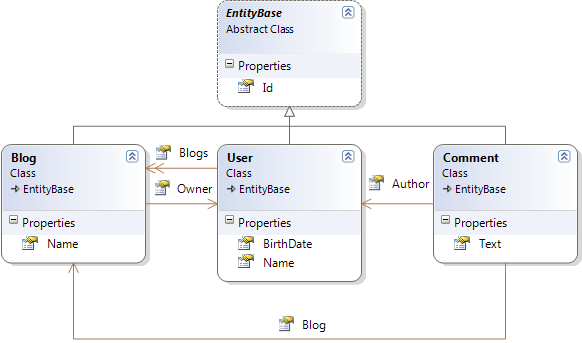
Теперь касательно его применения. Насколько я понял ConfORM поддерживает только автомаппинг основываясь на Ваших объектах. Для примера рассмотрим следующую модель:

domain_model

Все классы наследуют EntityBase который содержит единственное свойство Id типа int.

Теперь попробуем замапить эту модель. Для этого ConfORM использует класс ObjectRelationalMapper. Использовать его можно следующим образом:

public HbmMapping GenerateMappigs()
{
    IEnumerable<Type> domainEntities = this.GetDomainEntities();
    
    ObjectRelationalMapper relationalMapper = new ObjectRelationalMapper();
    relationalMapper.TablePerConcreteClass(domainEntities); // каждый не абстрактный объкт будет замаплен на свою таблицу.

    Mapper mapper = new Mapper(relationalMapper);
    HbmMapping mapping = mapper.CompileMappingFor(domainEntities); // создание самих маппингов.

    File.WriteAllText(@"d:\mappings.xml", Serialize(mapping)); // сохраняем маппинги в файл.
    return mapping;
}

/// <summary>
/// Gets all objects that are inherited from EntityBase.
/// </summary>
private IEnumerable<Type> GetDomainEntities()
{
    Assembly domainAssembly = typeof (EntityBase).Assembly;
    IEnumerable<Type> domainEntities = from t in domainAssembly.GetTypes()
                                       where t.BaseType == typeof(EntityBase) && !t.IsGenericType
                                       select t;
    return domainEntities;
}

Наверно что-то замапилось :). Чтобы это проверить можно сохранить конфигурацию в XML виде. Для того используется метод Serialize, его реализация такова:

/// <summary>
/// Generates XML string from NHibernate mappings
/// </summary>
protected static string Serialize(HbmMapping hbmElement)
{
    var setting = new XmlWriterSettings { Indent = true };
    var serializer = new XmlSerializer(typeof(HbmMapping));
    using (var memStream = new MemoryStream())
    {
        using (var xmlWriter = XmlWriter.Create(memStream, setting))
        {
            serializer.Serialize(xmlWriter, hbmElement);
            memStream.Flush();
            byte[] streamContents = memStream.ToArray();

            string result = Encoding.UTF8.GetString(streamContents);
            return result;
        }
    }
}

Выполнив этот код, получим следующий xml:

<?xml version="1.0" encoding="utf-8"?>
<hibernate-mapping xmlns:xsi="http://www.w3.org/2001/XMLSchema-instance" xmlns:xsd="http://www.w3.org/2001/XMLSchema" namespace="Conf.Entities" assembly="Conf" xmlns="urn:nhibernate-mapping-2.2">
  <class name="User">
    <id name="Id" type="Int32">
      <generator class="hilo" />
    </id>
    <property name="Name" />
    <property name="BirthDate" />
    <bag name="Blogs" inverse="true" cascade="all,delete-orphan">
      <key column="Owner" on-delete="cascade" />
      <one-to-many class="Blog" />
    </bag>
  </class>
  <class name="Blog">
    <id name="Id" type="Int32">
      <generator class="hilo" />
    </id>
    <property name="Name" />
    <many-to-one name="Owner" />
  </class>
  <class name="Comment">
    <id name="Id" type="Int32">
      <generator class="hilo" />
    </id>
    <property name="Text" />
    <many-to-one name="Author" />
    <many-to-one name="Blog" />
  </class>
</hibernate-mapping>

В общем то для существующей базы с такими маппингами уже можно работать. Как видите по умолчанию для первичных ключей используется hilo алгоритм, для коллекций используются Bag тэги, также для связи User-Blog выставляется правило каскадирования all, delete-orphan (толи это breaking change, но кажется раньше эта настройка выглядела как all-delete-orphan) и свойства называются так же как поля в базе.

В следующих постах хочу описать как кастомизировать автоматические маппинги и сделать полностью работающий пример.

Исходники